Compare commits
8 Commits
5457b8013a
...
main
| Author | SHA1 | Date | |
|---|---|---|---|
| bd8d9f4282 | |||
| 9c60b2493a | |||
| d5494024b1 | |||
| 4c462dda9e | |||
| b82dd3eeeb | |||
| 3033ef8a21 | |||
| 25f7d8cb2e | |||
| fa94424151 |


3
.gitmodules
vendored
@ -1,3 +0,0 @@
|
||||
[submodule "themes/ananke"]
|
||||
path = themes/ananke
|
||||
url = https://github.com/theNewDynamic/gohugo-theme-ananke.git
|
||||
|
||||
@ -4,7 +4,7 @@ type = "page"
|
||||
+++
|
||||
|
||||
|
||||
## STC Labs
|
||||
# STC Labs
|
||||
|
||||
**Una boutique del codice per la trasformazione digitale**
|
||||
|
||||
@ -56,4 +56,5 @@ STC Labs affianca le aziende nel tempo, diventando un **partner tecnologico di f
|
||||
Se cerchi un team che unisca competenza tecnica, visione strategica e cura artigianale del codice, STC Labs è il posto giusto da cui iniziare.
|
||||
|
||||
|
||||
[Contattaci](/contact)
|
||||
|
||||
|
||||
79
content/aibusiness.md
Normal file
@ -0,0 +1,79 @@
|
||||
+++
|
||||
title = "AI e processi aziendali"
|
||||
type = "page"
|
||||
+++
|
||||
|
||||
|
||||
|
||||
## Integrare l’Intelligenza Artificiale nei Processi Aziendali
|
||||
|
||||
L’adozione dell’Intelligenza Artificiale rappresenta oggi uno dei principali fattori di crescita e competitività per le imprese.
|
||||
STC Labs supporta le aziende nell’integrare soluzioni AI all’interno dei propri processi operativi, trasformando dati e automazione in valore concreto per il business.
|
||||
|
||||
### Perché integrare l’AI nei processi aziendali
|
||||
|
||||
Integrare l’AI non significa semplicemente introdurre nuove tecnologie, ma ripensare il modo in cui l’azienda opera, prende decisioni e crea valore.
|
||||
|
||||
I principali benefici includono:
|
||||
|
||||
* **Automazione delle attività ripetitive** – Riduzione dei costi operativi e aumento dell’efficienza.
|
||||
* **Decisioni basate sui dati** – Analisi predittive e insight in tempo reale.
|
||||
* **Miglioramento dell’esperienza cliente** – Personalizzazione, assistenza intelligente e tempi di risposta più rapidi.
|
||||
* **Scalabilità dei processi** – Capacità di crescere senza aumentare proporzionalmente le risorse.
|
||||
|
||||
### Il nostro approccio all’integrazione dell’AI
|
||||
|
||||
#### 1. Analisi dei processi
|
||||
|
||||
Partiamo da una valutazione approfondita dei processi aziendali esistenti per individuare:
|
||||
|
||||
* colli di bottiglia operativi
|
||||
* attività ad alto costo manuale
|
||||
* opportunità di automazione e ottimizzazione
|
||||
|
||||
Questa fase consente di definire una roadmap chiara e sostenibile.
|
||||
|
||||
#### 2. Identificazione dei casi d’uso ad alto impatto
|
||||
|
||||
Selezioniamo le aree in cui l’AI può generare valore rapido e misurabile, ad esempio:
|
||||
|
||||
* customer service automatizzato
|
||||
* analisi predittiva delle vendite
|
||||
* ottimizzazione della supply chain
|
||||
* classificazione intelligente dei documenti
|
||||
|
||||
#### 3. Sviluppo e integrazione delle soluzioni AI
|
||||
|
||||
Progettiamo e implementiamo soluzioni personalizzate che si integrano con i sistemi aziendali esistenti (ERP, CRM, piattaforme dati), garantendo:
|
||||
|
||||
* sicurezza e governance dei dati
|
||||
* continuità operativa
|
||||
* scalabilità tecnologica
|
||||
|
||||
#### 4. Adozione e cambiamento organizzativo
|
||||
|
||||
Il successo dell’AI dipende dalle persone.
|
||||
Supportiamo l’azienda con:
|
||||
|
||||
* formazione dei team
|
||||
* revisione dei flussi di lavoro
|
||||
* monitoraggio delle performance
|
||||
|
||||
### Risultati attesi
|
||||
|
||||
Le aziende che integrano l’AI nei propri processi ottengono tipicamente:
|
||||
|
||||
* riduzione dei costi operativi
|
||||
* aumento della produttività
|
||||
* maggiore velocità decisionale
|
||||
* nuovi modelli di business basati sui dati
|
||||
|
||||
### Inizia il tuo percorso di trasformazione AI
|
||||
|
||||
Integrare l’Intelligenza Artificiale è un percorso strategico, non solo tecnologico.
|
||||
Il team di STC Labs affianca le imprese in ogni fase, dall’analisi iniziale fino alla messa in produzione e all’evoluzione continua delle soluzioni.
|
||||
|
||||
**Contattaci per scoprire come l’AI può trasformare il tuo business.**
|
||||
|
||||
|
||||
[Richiedi informazioni](/contact)
|
||||
@ -1,11 +1,24 @@
|
||||
+++
|
||||
title = "Contact"
|
||||
title = "Contattaci"
|
||||
id = "contact"
|
||||
type = "page"
|
||||
+++
|
||||
|
||||
# We are here to help you
|
||||
# Siamo qui per aiutarti
|
||||
|
||||
Are you curious about something? Do you have some kind of problem with our products? As am hastily invited settled at limited civilly fortune me. Really spring in extent an by. Judge but built gay party world. Of so am he remember although required. Bachelor unpacked be advanced at. Confined in declared marianne is vicinity.
|
||||
## Parliamo delle tue esigenze
|
||||
|
||||
Please feel free to contact us, our customer service center is working for you 24/7.
|
||||
Hai una domanda, una curiosità o un progetto da sviluppare?
|
||||
Il team di STC Labs è a tua disposizione per ascoltare le tue necessità e trovare insieme la soluzione più adatta al tuo business.
|
||||
|
||||
Crediamo nel valore del confronto diretto: ogni richiesta è l’inizio di una possibile collaborazione.
|
||||
|
||||
## Contattaci
|
||||
|
||||
Puoi scriverci in qualsiasi momento all’indirizzo email:
|
||||
|
||||
<i class="fa-solid fa-envelope"></i> **[info@stclabs.it](mailto:info@stclabs.it)**
|
||||
|
||||
Ti risponderemo nel più breve tempo possibile, mettendo a tua disposizione competenza tecnica, visione strategica e supporto concreto.
|
||||
|
||||
Siamo pronti ad accompagnarti nel prossimo passo della tua evoluzione digitale.
|
||||
|
||||
86
content/customdev.md
Normal file
@ -0,0 +1,86 @@
|
||||
+++
|
||||
title = "Sviluppo Custom"
|
||||
type = "page"
|
||||
+++
|
||||
|
||||
|
||||
## Sviluppo Software Custom: la Boutique del Codice di STC Labs
|
||||
|
||||
### Un approccio artigianale allo sviluppo software
|
||||
|
||||
In un mercato dominato da soluzioni standardizzate, STC Labs adotta un modello differente: una vera **boutique del codice**, dove ogni progetto software viene progettato e realizzato su misura, con cura artigianale, visione strategica e attenzione ai dettagli.
|
||||
|
||||
Non creiamo semplicemente applicazioni: costruiamo **strumenti digitali unici**, perfettamente allineati ai processi, agli obiettivi e all’identità dell’azienda.
|
||||
|
||||
### Perché scegliere lo sviluppo software custom
|
||||
|
||||
Le soluzioni preconfezionate spesso impongono compromessi.
|
||||
Lo sviluppo custom permette invece di:
|
||||
|
||||
* adattare il software ai processi reali dell’azienda, non il contrario
|
||||
* ottenere maggiore efficienza operativa
|
||||
* integrare sistemi esistenti senza limitazioni
|
||||
* garantire scalabilità e controllo nel tempo
|
||||
* differenziarsi realmente dalla concorrenza
|
||||
|
||||
### Il nostro metodo: precisione, qualità, visione
|
||||
|
||||
#### 1. Ascolto e comprensione profonda
|
||||
|
||||
Ogni progetto nasce da un’analisi approfondita del contesto aziendale, degli obiettivi di business e delle esigenze operative.
|
||||
Questo ci consente di progettare soluzioni **coerenti, sostenibili e realmente utili**.
|
||||
|
||||
#### 2. Architettura su misura
|
||||
|
||||
Definiamo architetture software solide, modulari e scalabili, scegliendo tecnologie moderne e affidabili.
|
||||
Ogni componente viene pensato per durare nel tempo e crescere insieme all’azienda.
|
||||
|
||||
#### 3. Sviluppo con standard di eccellenza
|
||||
|
||||
Il nostro team lavora con:
|
||||
|
||||
* codice pulito e manutenibile
|
||||
* pratiche di test e controllo qualità
|
||||
* attenzione alle performance e alla sicurezza
|
||||
* integrazione fluida con piattaforme e servizi esterni
|
||||
|
||||
Questo è ciò che trasforma lo sviluppo in **artigianato tecnologico**.
|
||||
|
||||
#### 4. Collaborazione continua
|
||||
|
||||
Operiamo come partner tecnologico, non come semplice fornitore.
|
||||
Manteniamo un dialogo costante con il cliente per:
|
||||
|
||||
* validare ogni fase del progetto
|
||||
* adattarci rapidamente ai cambiamenti
|
||||
* garantire risultati concreti e misurabili
|
||||
|
||||
### Cosa realizziamo
|
||||
|
||||
Progettiamo e sviluppiamo:
|
||||
|
||||
* piattaforme web e applicazioni cloud-native
|
||||
* sistemi gestionali e strumenti operativi su misura
|
||||
* integrazioni tra ERP, CRM e servizi digitali
|
||||
* soluzioni data-driven e componenti basati su AI
|
||||
* API e infrastrutture scalabili
|
||||
|
||||
Ogni soluzione è **unica**, perché unica è l’azienda che la utilizza.
|
||||
|
||||
### Oltre il software: valore nel tempo
|
||||
|
||||
Il vero vantaggio dello sviluppo custom non è solo il prodotto finale, ma la capacità di evolvere.
|
||||
Per questo affianchiamo i clienti anche dopo il rilascio con:
|
||||
|
||||
* manutenzione evolutiva
|
||||
* ottimizzazione delle performance
|
||||
* estensione delle funzionalità
|
||||
* supporto strategico continuo
|
||||
|
||||
### Costruiamo insieme il tuo software
|
||||
|
||||
Se cerchi un partner che unisca **rigore ingegneristico, visione strategica e cura artigianale del dettaglio**, la boutique del codice di STC Labs è il punto di partenza.
|
||||
|
||||
**Parliamo del tuo prossimo progetto.**
|
||||
|
||||
[Richiedi informazioni](/contact)
|
||||
@ -1,26 +1,33 @@
|
||||
+++
|
||||
title = "Il Team"
|
||||
title = "Il Team di STC Labs"
|
||||
type = "page"
|
||||
+++
|
||||
|
||||
|
||||
## Il Team di STC Labs
|
||||
# La nostra esperienza per te
|
||||
|
||||
**Esperienza, visione e tecnologia al servizio della tua azienda**
|
||||
|
||||
La forza di **STC Labs** non risiede solo nelle competenze tecnologiche: il nostro team unisce **altissima professionalità** a una profonda comprensione dei processi aziendali.
|
||||
La forza di STC Labs non risiede solo nelle competenze tecnologiche: il nostro team unisce **altissima professionalità** a una profonda comprensione dei processi aziendali.
|
||||
|
||||
Non ci limitiamo a progettare software: **creiamo il sistema nervoso della tua azienda**, strumenti e flussi digitali che permettono alle persone e alle informazioni di muoversi in modo fluido, veloce e sicuro.
|
||||
Non ci limitiamo a progettare software.
|
||||
Costruiamo il **sistema nervoso digitale** dell’impresa: strumenti, piattaforme e flussi informativi che permettono a persone, dati e decisioni di muoversi in modo fluido, veloce e sicuro.
|
||||
|
||||
Siamo sviluppatori, consulenti e analisti con anni di esperienza nel mondo enterprise e digitale, e il nostro approccio è **artigianale e personalizzato**: ascoltiamo, analizziamo, costruiamo insieme.
|
||||
## Competenze multidisciplinari, visione concreta
|
||||
|
||||
Ogni progetto è per noi una **partnership**, dove tecnologia e strategia si incontrano per generare valore reale e duraturo.
|
||||
Siamo sviluppatori, consulenti e analisti con anni di esperienza nel mondo **enterprise** e digitale.
|
||||
Il nostro approccio è artigianale e personalizzato:
|
||||
|
||||
* ascoltiamo con attenzione il contesto aziendale
|
||||
* analizziamo processi, obiettivi e criticità reali
|
||||
* progettiamo soluzioni su misura
|
||||
* costruiamo insieme al cliente, passo dopo passo
|
||||
|
||||
### Variante più breve, ideale per layout a blocchi o landing page
|
||||
Ogni scelta tecnologica nasce sempre da una **visione di business chiara e sostenibile**.
|
||||
|
||||
**Il nostro team non realizza solo software.**
|
||||
Creiamo il sistema nervoso digitale della tua azienda: flussi, strumenti e processi che fanno muovere le informazioni in modo rapido e sicuro.
|
||||
## Partnership, non fornitura
|
||||
|
||||
Siamo un gruppo di sviluppatori, consulenti e analisti con anni di esperienza, unendo **competenza tecnica e comprensione profonda del business**.
|
||||
Per noi ogni progetto è una collaborazione strategica.
|
||||
Tecnologia e strategia si incontrano per generare **valore concreto, misurabile e duraturo**, accompagnando l’azienda nel tempo e nella sua evoluzione.
|
||||
|
||||
Questo è ciò che rende il nostro team non solo un insieme di competenze, ma un vero **partner di crescita**.
|
||||
|
||||
49
content/informazioni.md
Normal file
@ -0,0 +1,49 @@
|
||||
+++
|
||||
title = "Informazioni"
|
||||
type = "page"
|
||||
+++
|
||||
|
||||
## STC LABS S.r.l. Società Benefit
|
||||
|
||||
informazioni previste di commi 11 e 12 art 25 DL 179/2012
|
||||
|
||||
La società è stata costituita in Lucca il giorno 28 Agosto 2025 presso lo studio del Notaio dr. Domenico Costantino, Viale Regina Margherita n.121, iscritto nel Ruolo dei Distretto Notarile di Lucca.
|
||||
|
||||
La sede legale ed operativa è in via Luigi Casale n. 7 a Terni dove la società è anche incubata presso l’Incubatore Certificato Maestrale Innovation Creative Hub (Mich Srl).
|
||||
|
||||
La società si occupa dello sviluppo di una infrastruttura informatica web-based dedicata all’e-commerce Business to Business e all’automazione ed il supporto della rete di vendita, innovativa e ad alto valore tecnologico.
|
||||
|
||||
Nella sede sociale la società si occupa dello sviluppo, produzione e commercializzazione di applicazioni web e piattaforme digitali multi-sided innovative. Progettazione struttura contenuti e compilazione codici informatici per software di sistema.
|
||||
|
||||
I soci della Srl sono:
|
||||
|
||||
- GIUNTI MAURIZIO
|
||||
- ISTRUZIONE E FORMAZIONE: Liceo Scientifico, Laurea in Scienze Statistiche e Attuariali, conseguita presso la facoltà di Economia e Commercio dell’Università di Firenze (1996).
|
||||
- ESPERIENZE LAVORATIVE: Agente di Commercio (1989/1992), collaborazioni con riviste di informatica tra le quali AmigaByte, Computer Programming e Professional Developer Journal, collaborazioni con software house tra le quali Proxima, DigicSoft, CDR, Micronix Computer e Mediared progettando e realizzando software in ambito telematico e software di controllo per l’automazione industriale (1989/2000), responsabile della divisione Networking, responsabile della divisione eBusiness e responsabile per l’Area Sviluppo e Innovazione presso la Micronix Computer Spa di Montecatini Terme (1996/2004), collaborazioni come consulente esterno con la software house Novadigm Inc. In Mahwah, New Jersey, U.S.A. (1998/1999), fondatore della MGShareware per sviluppare e commercializzare il software FreeRIP (2006), socio e CTO di MyVideoDaily azienda per la diffusione di video via Internet (2006/2007), fondatore del sito poinx.com e della società Poinx Srl (2010), fondatore del sito 360qpon.it (2013), fondatore e CTO di Rebates.com azienda specializzata nella diffusione di coupon per il mercato USA dei medicinali (2015), fondatore della Codeguru Srl, società di software specializzata nello sviluppo di software per il web, l’ecommerce e il web marketing (2015), partecipazione alla fondazione dell’azienda Ragu.Ai con sede in Nevada U.S.A. dedicata allo sviluppo di piattaforme di integrazione di software di intelligenza artificiale/LLM per le imprese (2024), collaborazione con la ST Company (dal 2019).
|
||||
- LABIANCA COSIMO DAMIANO:
|
||||
- ISTRUZIONE E FORMAZIONE: Maturità Scientifica, Studi universitari presso la facoltà di Economia e Commercio Università Cattolica di Milano, Formazioni sistemistica su S/38, AS/400 Ibm, iSeries, Certificazioni IBM sistema operativo AS/400 fino Al S.O. 4.5, Formazione in area Amministrativa e controllo, Corsi relativi ad analisi di processo aziendale.
|
||||
- ESPERIENZE LAVORATIVE: Operatore di sistema presso la Tecnical Impianti (1981), Programmatore presso la Isolabella spa (1981/1982), Programmatore presso la Gabetti spa (1982/1998), Consulente presso la IT Free-Lance (1988), project Leader presso lo Studio Zagaglia S.R.L. (1988/1994), Project leader presso la Datasys Network S.P.A (1994/1997), Responsabile di una Business Unit, Project Manager, Focal point relazioni esterne con IBM (ACG), componente del comitato tecnico nazionale del Club ACG, Supporto pre/post-sales alle direzioni marketing e vendite, Assegnazione diretta dei clienti di fascia alta, DIREZIONE DI progetti relativi alla produzioni di soluzioni applicative, formatore presso i clienti in ambito ERP per i moduli ACG in area finance e controllo, compiti direttivi con mansioni di direttore tecnico per l’intera area prodotti sviluppo & innovazione di tutto il network presso la Micronix Computer spa (1997/2005), Amministratore delegato e Direttore commerciale e Marketing della ST SARCE Toscana srl (2006/2012), Amministratore delegato, Direttore Generale e CEO della ST Company srl (dal 2013).
|
||||
- BORRI SILVIA
|
||||
- ISTRUZIONE E FORMAZIONE: Diploma di Operatore Turistico presso l’Istituto Professionale per il Commercio “Giovanni da Verrazzano” di Firenze (1989), Laurea in Giurisprudenza presso l’Università degli Studi di Firenze (1994), Corso Universitario di Formazione “Tutte le novità sul lavoro pubblico” presso I.M.T. Scuola Alti Studi Lucca (2016), Corso Universitario di Formazione “Anticorruzione e trasparenza” presso Università degli Studi di Pisa (2016), Corso Universitario di Formazione “La riforma della Pubblica Amministrazione. Novità in materia di personale e organizzazione” presso I.M.T. Scuola Alti Studi Lucca (2017), Formazione per certificazione competenze digitali (2017/2018), Corso di formazione “La pubblica amministrazione al servizio del cittadino e delle imprese per migliorare l’organizzazione e la qualità del sistema Italia” presso la Scuola Internazionale Superiore di Studi Avanzati e EBIT – Scuola di Formazione e Perfezionamento per la P.A. (2018), Corso Universitario di Alta Formazione “Data protection e Privacy Officer” presso l’Università di Bologna (2019), Corso universitario di formazione sulla P.A. digitale organizzato da LUMSA – Formel (2019), Corso universitario di formazione su Anticorruzione e Trasparenza organizzato dall’Università di Pisa (2020), Corso “Maestro della Protezione dei Dati & Data Protection Designer” organizzato dall’Istituto Italiano per la Privacy e la Valorizzazione dei Dati (2022/2023), Formazione per la certificazione delle competenze digitali (2023), Corso di formazione manageriale “Responsabile Protezione Dati ‘RPD/DPO’” realizzato da ASMEFORM s.r.l. (2024), Corso “Competenze manageriali e strumenti per lo sviluppo dei collaboratori – Percorso Formativo Middle Management” organizzato da Si.Camera (2025).
|
||||
- ESPERIENZE LAVORATIVE: Dipendente, Capo del servizio Anagrafico certificativo, dirigente del Settore Affari Generali, Amministrazione e Contabilità, Responsabile della Trasparenza, Componente task force prevenzione corruzione e trasparenza, Gestore delle Segnalazioni in materia antiriciclaggio e lotta al terrorismo, Dirigente del Settore Anagrafico e Regolazione del Mercato, Capo del Servizio Registro Imprese e REA con funzioni relativa alla gestione delle partecipate, Responsabile della Protezione dei dati personali (DPO), Incarico di Elevata Qualificazione “Servizio Anagrafico sede di Prato – Partecipate e DPO”, Dirigente Area 4 “Anagrafe e semplificazione” presso la Camera di Commercio, Industria, Artigianato e Agricoltura di Prato (1995/2025), Responsabile della Protezione dei dati personali (DPO) presso la Camera di Commercio, Industria, Artigianato e Agricoltura di Terni (2020).
|
||||
- LABIANCA MARTINA
|
||||
- ISTRUZIONE E FORMAZIONE: Liceo Linguistico A. Vallisneri DI Lucca (2010/2015), Laurea Triennale in Relazioni Pubbliche e Comunicazione d’Impresa (2015/2018), Laurea Magistrale in Marketing, Comportamento del Consumatore e Comunicazione – Marketing Digitale (2018/2020), IULM – Libera università di lingue e media (2015/2020), Certificazioni IETS, DELF, DELE, ECDL.
|
||||
- ESPERIENZE LAVORATIVE: Traduzione del sito web in inglese presso la Studio InTre (2014), Addetto alle vendite presso Naracamicie (2018/2019), Rappresentante del Gruppo di Assicurazione Qualità – Commissione di Valutazione del Corso di Laurea Magistrale presso lo IULM – (2019/2020), Social Content e Comunicazione Digitale presso Sky Italia Srl (2020/2021), Global Digital Content Specialist presso Guccio Gucci SPA (dal 2021).
|
||||
- VEZZANI RICCARDO
|
||||
- ISTRUZIONE E FORMAZIONE: Diploma di Perito Commerciale con specializzazione commercio con l’estero conseguito presso l’Istituto Tecnico Marchi di Pescia (1985), Corso di Formazione Professionale “Programmatore in linguaggio RPG II” presso la Micronix Spa (1986), Corso di Formazione Professionale “Programmatore in linguaggio RPG III” presso la Micronix Spa (1988), Corso per utilizzo programmi contabilità ACG presso IBM (1990), Corso per utilizzo programmi contabilità ACG versione 3 presso IBM (1994), Corso per approfondimento conoscenza per l’utilizzo del sistema operativo Os400 presso IBM (2000), Corso per creazione stampe grafiche Infoprint presso IBM (2006).
|
||||
- ESPERIENZE LAVORATIVE: Analisi, progettazione e realizzazione di sistemi informativi Presso la Micronix Spa (1986/2005), Consulente senior e Docente presso la ST Company Srl SB (dal 2006).
|
||||
- ST COMPANY Srl SB
|
||||
|
||||
Il legale rappresentante della società, sottoscrittore dell’adempimento ai sensi degli articoli 46,47 e 76 del dpr 445/2000, dichiara la veridicità dell’elenco soci presente nel modulo S allegato alla pratica e la sua trasparenza rispetto a fiduciarie o holding.
|
||||
|
||||
Società partecipate: nessuna.
|
||||
|
||||
La società è domiciliata presso l’Incubatore Certificato Maestrale Innovation Creative Hub (Mich Srl).
|
||||
|
||||
Attualmente non presenti accordi con Università e Centri di Ricerca.
|
||||
|
||||
Attualmente non presenti privative industriali/software.
|
||||
|
||||
|
||||
Terni (TR) 28 Agosto 2025
|
||||
STC LABS S.r.l. Società Benefit
|
||||
69
content/integrazionicustom.md
Normal file
@ -0,0 +1,69 @@
|
||||
+++
|
||||
title = "Integrazioni Custom"
|
||||
type = "page"
|
||||
+++
|
||||
|
||||
# Consulenza e soluzioni di Business Integration
|
||||
|
||||
**Connetti sistemi, processi e canali di vendita per far crescere davvero il tuo business.**
|
||||
|
||||
Negli anni abbiamo maturato una solida esperienza nell’integrazione tra **gestionali aziendali, piattaforme eCommerce e sistemi digitali complessi**, lavorando al fianco di aziende che avevano bisogno di far dialogare strumenti diversi, automatizzare i processi e ottenere dati affidabili in tempo reale.
|
||||
|
||||
Questa esperienza ci permette oggi di offrire **consulenza professionale e soluzioni di Business Integration sviluppate su misura**, progettate per adattarsi ai flussi operativi reali della tua organizzazione — non il contrario.
|
||||
|
||||
---
|
||||
|
||||
## Dall’integrazione tecnica al valore per il business
|
||||
|
||||
Integrare sistemi non significa solo collegare software:
|
||||
significa **semplificare i processi**, **ridurre gli errori**, **accelerare le vendite** e dare alle persone strumenti che funzionano davvero.
|
||||
|
||||
Per questo il nostro approccio parte sempre dal business:
|
||||
|
||||
* Analisi dei processi aziendali e dei flussi informativi
|
||||
* Identificazione delle criticità operative e delle inefficienze
|
||||
* Progettazione di architetture di integrazione scalabili e sicure
|
||||
* Sviluppo di soluzioni personalizzate, integrate con i sistemi esistenti
|
||||
* Supporto continuo nell’evoluzione digitale dell’azienda
|
||||
|
||||
---
|
||||
|
||||
## Esperienza concreta tra ERP ed eCommerce
|
||||
|
||||
Abbiamo realizzato integrazioni tra numerosi:
|
||||
|
||||
* **Gestionali ERP** di mercato e soluzioni proprietarie
|
||||
* **Piattaforme eCommerce B2B e B2C**
|
||||
* Sistemi di logistica, pagamenti, CRM e strumenti di vendita
|
||||
* Applicazioni verticali sviluppate su misura
|
||||
|
||||
Questo ci consente di affrontare progetti complessi con una visione completa, riducendo tempi di implementazione e rischi progettuali.
|
||||
|
||||
---
|
||||
|
||||
## Soluzioni su misura, non pacchetti standard
|
||||
|
||||
Ogni azienda ha processi, regole commerciali e modelli organizzativi differenti.
|
||||
Per questo progettiamo **soluzioni ad hoc di Business Integration**, capaci di:
|
||||
|
||||
* adattarsi ai sistemi già in uso
|
||||
* evolvere nel tempo insieme al business
|
||||
* garantire affidabilità, sicurezza e performance
|
||||
* semplificare il lavoro quotidiano di clienti, agenti e team interni
|
||||
|
||||
Il risultato è un ecosistema digitale realmente connesso, dove i dati fluiscono senza interruzioni e le decisioni diventano più rapide e consapevoli.
|
||||
|
||||
---
|
||||
|
||||
## Il nostro obiettivo: far funzionare davvero la trasformazione digitale
|
||||
|
||||
Non ci limitiamo a sviluppare integrazioni tecniche.
|
||||
Il nostro obiettivo è **trasformare la complessità tecnologica in vantaggio competitivo concreto**, aiutando le aziende a crescere con strumenti solidi, scalabili e perfettamente integrati.
|
||||
|
||||
---
|
||||
|
||||
### Parliamo del tuo progetto
|
||||
|
||||
Se stai affrontando problemi di integrazione tra gestionale, eCommerce o altri sistemi aziendali, possiamo aiutarti a progettare una soluzione efficace, sostenibile e davvero utile per il tuo business.
|
||||
|
||||
[Contattaci per una consulenza](/contact)
|
||||
36
content/mydeskb2b.md
Normal file
@ -0,0 +1,36 @@
|
||||
+++
|
||||
title = "MyDesk B2B"
|
||||
type = "pageimg"
|
||||
image1 = "/img/macbook-air-on-desk.jpg"
|
||||
image2 = "/img/notes.jpg"
|
||||
image1_alt = "Descrizione immagine 1"
|
||||
image2_alt = "Descrizione immagine 2"
|
||||
+++
|
||||
|
||||
|
||||
## MyDesk B2B
|
||||
|
||||
**La piattaforma B2B che connette clienti, forza vendita e gestionale aziendale in un unico ecosistema digitale.**
|
||||
|
||||
MyDesk è la soluzione pensata per le aziende che vogliono digitalizzare e semplificare la gestione degli ordini, migliorare la collaborazione con la rete agenti e offrire ai clienti un’esperienza d’acquisto moderna, autonoma e sempre connessa ai dati aziendali.
|
||||
|
||||
Grazie all’integrazione completa con il gestionale, MyDesk garantisce informazioni aggiornate in tempo reale, maggiore visibilità sulle attività commerciali e processi più rapidi ed efficienti lungo tutta la catena di vendita.
|
||||
|
||||
---
|
||||
|
||||
## Area B2B clienti
|
||||
|
||||
Con MyDesk i tuoi clienti accedono a un ambiente dedicato, intuitivo e progettato per rendere ogni operazione semplice e immediata:
|
||||
|
||||
* **Catalogo prodotti personalizzato** con prezzi specifici per ogni cliente
|
||||
* **Inserimento ordini self-service** con un’esperienza simile a un eCommerce, basata sulla metafora del carrello
|
||||
* **Pagamenti flessibili**, tramite carta di credito oppure secondo le condizioni commerciali già in essere
|
||||
* **Storico ordini sempre disponibile**, inclusi quelli inseriti al di fuori della piattaforma
|
||||
* **Visibilità completa su consegne pianificate ed estratto conto aggiornato**
|
||||
|
||||
---
|
||||
|
||||
**MyDesk trasforma la gestione B2B in un’esperienza digitale evoluta, aumentando l’autonomia dei clienti, l’efficienza della forza vendita e il controllo per l’azienda.**
|
||||
|
||||
|
||||
[Richiedi informazioni](/contact)
|
||||
44
content/mydeskvendite.md
Normal file
@ -0,0 +1,44 @@
|
||||
+++
|
||||
title = "MyDesk Rete Vendita"
|
||||
type = "page"
|
||||
+++
|
||||
|
||||
|
||||
## MyDesk Rete Vendita
|
||||
|
||||
**Controllo totale sulla forza commerciale, informazioni sempre disponibili, processi più veloci.**
|
||||
|
||||
Il modulo Rete Vendita di MyDesk è progettato per supportare agenti, capi area e direzione commerciale in ogni fase dell’attività quotidiana, semplificando la gestione degli ordini, migliorando l’accesso alle informazioni strategiche e aumentando l’efficienza operativa sul campo.
|
||||
|
||||
Completamente integrato con il gestionale aziendale, offre una visione aggiornata e centralizzata di clienti, vendite e performance commerciali, trasformando la rete agenti in un motore digitale di crescita.
|
||||
|
||||
---
|
||||
|
||||
## Gestione rete agenti
|
||||
|
||||
Strumenti avanzati ma semplici da utilizzare permettono di coordinare l’intera organizzazione commerciale:
|
||||
|
||||
* **Inserimento ordini cliente** con condizioni configurabili per singolo agente, come limiti massimi di sconto applicabile
|
||||
* **Struttura gerarchica multilivello** (agente, capo area, direttore commerciale, ecc.) per un controllo chiaro di ruoli e responsabilità
|
||||
* **Accesso immediato alla situazione completa del cliente**: storico ordini, consegne, DDT, estratto conto, storico prezzi e molto altro
|
||||
* **Statistiche di vendita intuitive** per monitorare rapidamente andamento e risultati
|
||||
|
||||
---
|
||||
|
||||
## Funzionalità a valore aggiunto
|
||||
|
||||
MyDesk arricchisce l’operatività della forza vendita con strumenti evoluti che semplificano il lavoro quotidiano:
|
||||
|
||||
* **CRM integrato**, semplice e immediato da utilizzare
|
||||
* **Gestione resi completamente integrata**
|
||||
* **Workflow per la gestione dei progetti commerciali**
|
||||
* **Gestione strutturata delle promozioni**
|
||||
* **Documentazione centralizzata**, sempre accessibile
|
||||
* **Interfacce ottimizzate per tablet**, ideali per l’utilizzo in mobilità
|
||||
|
||||
---
|
||||
|
||||
**Con MyDesk la tua rete vendita diventa più autonoma, informata e performante, mentre l’azienda ottiene maggiore controllo, velocità operativa e qualità del servizio al cliente.**
|
||||
|
||||
|
||||
[Richiedi informazioni](/contact)
|
||||
34
content/pulseofficina.md
Normal file
@ -0,0 +1,34 @@
|
||||
+++
|
||||
title = "Pulse Officina"
|
||||
type = "page"
|
||||
+++
|
||||
|
||||
|
||||
## Pulse Officina
|
||||
|
||||
Pulse è un sistema per la raccolta dei tempi di lavorazione in officina, progettato per semplificare e velocizzare il tracciamento delle attività svolte dal personale operativo. L’interfaccia, ottimizzata per tablet, consente agli operatori di selezionare tramite touch progetto, commessa e attività, identificarsi con badge (tecnologia NTAG) e registrare automaticamente l’inizio e la fine delle lavorazioni. Un backend amministrativo web‑based permette di monitorare, verificare e correggere i tempi raccolti prima dell’invio al gestionale aziendale. La piattaforma è erogata in modalità SaaS, può gestire contemporaneamente più officine tramite un unico pannello di controllo centralizzato ed è dotata di automatismi per la chiusura automatica delle lavorazioni non terminate al termine dell’orario di lavoro.
|
||||
|
||||
### Funzionalità principali
|
||||
|
||||
- Raccolta tempi in officina
|
||||
- Interfaccia touch ottimizzata per tablet
|
||||
- Selezione guidata di progetto, commessa e attività
|
||||
- Identificazione operatore tramite badge NTAG
|
||||
- Tracciamento automatico di inizio e fine lavorazione
|
||||
- Utilizzabile in officine e ambienti di lavoro analoghi
|
||||
- Controllo e validazione dati
|
||||
- Backend amministrativo completamente web‑based
|
||||
- Monitoraggio centralizzato delle attività registrate
|
||||
- Verifica e correzione dei tempi prima dell’integrazione con il gestionale
|
||||
- Sinottico in tempo reale delle attività in corso
|
||||
|
||||
### Gestione multi‑officina e automazioni
|
||||
|
||||
- Gestione simultanea di più officine con un unico pannello di controllo
|
||||
- Chiusura automatica delle lavorazioni aperte a fine giornata
|
||||
- Architettura SaaS senza installazioni locali (interamente web based)
|
||||
- Possibilità di integrazione con orologi presenze (da valutare)
|
||||
|
||||
|
||||
|
||||
[Richiedi informazioni](/contact)
|
||||
31
content/pulseservice.md
Normal file
@ -0,0 +1,31 @@
|
||||
+++
|
||||
title = "Pulse Service"
|
||||
type = "page"
|
||||
+++
|
||||
|
||||
|
||||
## Pulse Service
|
||||
|
||||
|
||||
Pulse Service è un sistema web‑based per la raccolta dei rapportini di lavorazione del personale operativo esterno, come squadre su cantieri o tecnici impegnati presso clienti. La piattaforma mette a disposizione un’interfaccia ottimizzata per smartphone, fruibile anche come Progressive Web App (PWA), che consente agli operatori di registrare ore lavorate e spese accessorie direttamente sul campo in modo semplice e immediato. È inoltre presente un’interfaccia amministrativa per il controllo, la modifica e la validazione dei dati raccolti, con successivo invio al gestionale nell’ambito della gestione progetti. Il sistema include report operativi con esportazione in Excel per il controllo rapido delle informazioni raccolte e la generazione dei timesheet del personale.
|
||||
|
||||
### Funzionalità principali
|
||||
|
||||
- Raccolta rapportini sul campo
|
||||
- Inserimento ore lavorate da personale esterno su clienti o cantieri
|
||||
- Tracciamento di diverse tipologie di ore (ordinarie, straordinarie, viaggio, ecc.)
|
||||
- Registrazione delle spese sostenute con allegato di immagini di ricevute e scontrini
|
||||
- Interfaccia ottimizzata per smartphone e utilizzabile come app installabile (PWA)
|
||||
- Controllo amministrativo e reporting
|
||||
- Pannello amministrativo web per verifica, modifica e validazione dei dati raccolti
|
||||
- Versamento delle ore lavorate sul gestionale Alyante/TSE sulla gestione progetti
|
||||
- Report riepilogativi con esportazione in Excel
|
||||
- Generazione semplificata dei timesheet del personale
|
||||
|
||||
### Estendibilità
|
||||
- Possibilità di integrazione futura con liste materiali utilizzati
|
||||
- Integrazione con gestione DDT
|
||||
|
||||
|
||||
|
||||
[Richiedi informazioni](/contact)
|
||||
@ -5,13 +5,49 @@ type = "page"
|
||||
|
||||
# Il nostro impegno
|
||||
|
||||
## Impresa e impatto positivo, insieme
|
||||
|
||||
Le **Società Benefit** rappresentano un’evoluzione concreta del concetto tradizionale di impresa.
|
||||
Accanto alla generazione di valore economico, integrano nella propria missione statutaria l’impegno a produrre un impatto **positivo, misurabile e duraturo** sulla società e sull’ambiente, operando in modo responsabile, sostenibile e trasparente.
|
||||
|
||||
In questo contesto, STC Labs interpreta la forma di Società Benefit non come un’etichetta, ma come una **scelta strategica e culturale** che orienta ogni decisione aziendale.
|
||||
|
||||
## Una visione d’impresa più ampia
|
||||
|
||||
A differenza dei modelli tradizionali, focalizzati principalmente sulla massimizzazione del profitto, la Società Benefit adotta una prospettiva più completa, in cui la crescita economica è strettamente connessa al **benessere delle persone, della comunità e dell’ambiente**.
|
||||
|
||||
Per questo abbiamo integrato formalmente nel nostro statuto, insieme agli obiettivi di redditività:
|
||||
|
||||
* il contributo allo sviluppo sostenibile
|
||||
* la valorizzazione delle competenze e delle relazioni umane
|
||||
* la responsabilità verso il territorio e l’ecosistema
|
||||
* la creazione di valore condiviso per tutti gli stakeholder
|
||||
|
||||
La forma giuridica di Società Benefit diventa così uno **strumento solido di coerenza nel tempo**, capace di preservare identità, missione e valori anche durante fasi di trasformazione aziendale.
|
||||
|
||||
## Continuità, trasparenza e visione di lungo periodo
|
||||
|
||||
Questo modello consente di mantenere allineati obiettivi economici e impatto positivo anche in momenti chiave come:
|
||||
|
||||
* crescita dimensionale o apertura a nuovi investimenti
|
||||
* passaggi generazionali o cambiamenti di leadership
|
||||
* operazioni straordinarie o percorsi di quotazione
|
||||
|
||||
Allo stesso tempo, favorisce decisioni strategiche orientate al **lungo periodo**, rafforzando resilienza, credibilità e sostenibilità del business.
|
||||
|
||||
## Il futuro dell’impresa
|
||||
|
||||
Le Società Benefit non appartengono al mondo del non profit né sostituiscono l’impresa tradizionale: ne rappresentano piuttosto una **evoluzione responsabile**, più adatta alle sfide economiche, sociali e ambientali contemporanee.
|
||||
|
||||
Crediamo che il futuro passi dalla capacità di unire **innovazione, solidità economica e impatto positivo** in un’unica visione.
|
||||
È questa la direzione che guida ogni giorno il nostro lavoro.
|
||||
|
||||
|
||||
|
||||
|
||||
|
||||
|
||||
Le **Società Benefit (SB)** rappresentano un’evoluzione significativa del concetto tradizionale di impresa. Accanto all’obiettivo di generare profitto, esse integrano nella propria missione statutaria l’impegno a creare un **impatto positivo e misurabile sulla società e sull’ambiente**, operando in modo responsabile, sostenibile e trasparente.
|
||||
|
||||
In questo contesto, **STC Labs**, in qualità di Società Benefit, incarna un vero e proprio cambiamento di paradigma. A differenza delle società tradizionali, orientate prevalentemente alla massimizzazione del valore economico e alla distribuzione di dividendi agli azionisti, le Società Benefit adottano una visione più ampia e moderna dell’attività d’impresa, nella quale la crescita economica è inscindibilmente legata al benessere collettivo.
|
||||
|
||||
STC Labs ha scelto di integrare formalmente nel proprio statuto, oltre agli obiettivi di redditività, l’ambizione di contribuire in modo concreto allo sviluppo sostenibile, alla valorizzazione delle persone e alla tutela dell’ambiente. La forma giuridica di Società Benefit costituisce uno **strumento legale solido e innovativo**, capace di garantire l’allineamento della missione aziendale nel lungo periodo e di favorire la creazione di **valore condiviso** per tutti gli stakeholder.
|
||||
|
||||
Questo modello consente di preservare l’identità e i valori dell’impresa anche in momenti di cambiamento, come aumenti di capitale, passaggi generazionali, cambi di leadership, operazioni di cessione o percorsi di quotazione in borsa. Al contempo, offre maggiore flessibilità strategica e una visione di lungo termine nelle decisioni aziendali, senza compromettere la coerenza della missione.
|
||||
|
||||
Le Società Benefit non sono imprese sociali né una semplice estensione del settore non profit. Rappresentano, piuttosto, una **trasformazione positiva dei modelli di impresa a scopo di lucro**, rendendoli più resilienti, responsabili e adeguati alle sfide e alle opportunità del XXI secolo. STC Labs crede fermamente che il futuro dell’impresa passi da qui: dalla capacità di coniugare innovazione, profitto e impatto positivo in un’unica, solida visione.
|
||||
|
||||
86
content/systemintegration.md
Normal file
@ -0,0 +1,86 @@
|
||||
+++
|
||||
title = "System integration"
|
||||
type = "page"
|
||||
+++
|
||||
|
||||
## Integrazione dei Sistemi Software: l’Esperienza di STC Labs al Servizio del Business
|
||||
|
||||
### Connettere tecnologie, processi e persone
|
||||
|
||||
Nel contesto aziendale moderno, il valore non nasce dai singoli sistemi, ma dalla loro capacità di **comunicare in modo efficace**.
|
||||
STC Labs vanta una solida esperienza nell’integrazione di ecosistemi software complessi, aiutando le imprese a trasformare piattaforme frammentate in **infrastrutture digitali coerenti, efficienti e scalabili**.
|
||||
|
||||
### Perché l’integrazione dei sistemi è strategica
|
||||
|
||||
Molte aziende operano con applicazioni sviluppate in momenti diversi, spesso non progettate per collaborare tra loro. Questo genera:
|
||||
|
||||
* duplicazione dei dati
|
||||
* processi manuali inefficienti
|
||||
* difficoltà di controllo e reporting
|
||||
* rallentamenti operativi
|
||||
|
||||
Un’integrazione progettata correttamente consente invece di:
|
||||
|
||||
* centralizzare e valorizzare i dati aziendali
|
||||
* automatizzare i flussi operativi
|
||||
* migliorare la qualità delle decisioni
|
||||
* aumentare velocità ed efficienza dei processi
|
||||
|
||||
### L’approccio STC Labs all’integrazione software
|
||||
|
||||
#### 1. Analisi dell’ecosistema esistente
|
||||
|
||||
Studiamo in profondità l’architettura applicativa del cliente per comprendere:
|
||||
|
||||
* sistemi core (ERP, CRM, piattaforme verticali)
|
||||
* flussi di dati tra applicazioni
|
||||
* criticità operative e colli di bottiglia
|
||||
* requisiti di sicurezza e governance
|
||||
|
||||
Questa fase permette di definire una strategia di integrazione **realistica e sostenibile**.
|
||||
|
||||
#### 2. Progettazione di architetture di integrazione scalabili
|
||||
|
||||
Disegniamo soluzioni che garantiscono:
|
||||
|
||||
* interoperabilità tra sistemi eterogenei
|
||||
* gestione affidabile dei dati
|
||||
* modularità e facilità di evoluzione
|
||||
* compatibilità con infrastrutture cloud e ibride
|
||||
|
||||
Utilizziamo pattern architetturali moderni per assicurare **robustezza e continuità operativa**.
|
||||
|
||||
#### 3. Implementazione e orchestrazione dei flussi
|
||||
|
||||
Realizziamo integrazioni tramite:
|
||||
|
||||
* API sicure e documentate
|
||||
* middleware e servizi di orchestrazione
|
||||
* sincronizzazione e trasformazione dei dati
|
||||
* automazione dei processi inter-applicativi
|
||||
|
||||
Ogni integrazione viene testata per garantire **affidabilità, performance e resilienza**.
|
||||
|
||||
#### 4. Monitoraggio, governance ed evoluzione
|
||||
|
||||
Un’integrazione efficace deve durare nel tempo.
|
||||
Per questo offriamo:
|
||||
|
||||
* sistemi di monitoraggio dei flussi
|
||||
* gestione degli errori e continuità operativa
|
||||
* aggiornamenti evolutivi
|
||||
* supporto strategico continuo
|
||||
|
||||
### Un partner affidabile per progetti complessi
|
||||
|
||||
Grazie all’esperienza maturata in diversi settori e contesti tecnologici, STC Labs è in grado di:
|
||||
|
||||
* gestire progetti di integrazione ad alta complessità
|
||||
* dialogare con stakeholder tecnici e di business
|
||||
* ridurre rischi, tempi e costi di implementazione
|
||||
* garantire risultati concreti e misurabili
|
||||
|
||||
Il nostro obiettivo non è solo collegare sistemi, ma **abilitare un nuovo livello di efficienza operativa e controllo del business**
|
||||
|
||||
|
||||
[Richiedi informazioni](/contact)
|
||||
@ -7,4 +7,4 @@ description: >
|
||||
<li>Scopri come lavoriamo</li>
|
||||
</ul>
|
||||
image: "img/carousel/c1a.jpg"
|
||||
href: "contact"
|
||||
href: "/contact"
|
||||
|
||||
@ -6,4 +6,4 @@ description: >
|
||||
<li>Analizziamo, semplifichiamo e trasformiamo i processi in sistemi digitali efficienti e integrati.</li>
|
||||
</ul>
|
||||
image: "img/carousel/c2a.jpg"
|
||||
href: 'contact'
|
||||
href: '/contact'
|
||||
|
||||
@ -7,4 +7,4 @@ description: >
|
||||
<li>Parliamo del tuo progetto</li>
|
||||
</ul>
|
||||
image: "img/carousel/c3a.jpg"
|
||||
href: "faq"
|
||||
href: "/contact"
|
||||
|
||||
3
data/clients-no/base.yaml
Normal file
@ -0,0 +1,3 @@
|
||||
name: "Base"
|
||||
image: "img/clients/base.png"
|
||||
url: "https://basenet.it"
|
||||
88
hugo.toml
@ -4,6 +4,7 @@ title = 'STC Labs SRL SB'
|
||||
theme = 'hugo-universal-theme'
|
||||
|
||||
|
||||
|
||||
# Site language. Available translations in the theme's `/i18n` directory.
|
||||
defaultContentLanguage = "it"
|
||||
|
||||
@ -43,7 +44,7 @@ pluralizelisttitles = false
|
||||
[[menu.main]]
|
||||
name = "Chi siamo"
|
||||
identifier = "menu.chisiamo"
|
||||
url = "/img/pc-code1.png"
|
||||
url = "/img/pc-stclabs.png"
|
||||
weight = 3
|
||||
|
||||
[[menu.main]]
|
||||
@ -83,7 +84,7 @@ pluralizelisttitles = false
|
||||
weight = 3
|
||||
|
||||
[[menu.main]]
|
||||
name = "eCommerce"
|
||||
name = "e-business"
|
||||
identifier = "section.ecommerce"
|
||||
url = ""
|
||||
weight = 1
|
||||
@ -91,17 +92,35 @@ pluralizelisttitles = false
|
||||
post = 1
|
||||
|
||||
[[menu.main]]
|
||||
name = "MyDesk"
|
||||
url = ""
|
||||
name = "MyDesk B2B"
|
||||
url = "/mydeskb2b"
|
||||
weight = 1
|
||||
parent = "section.ecommerce"
|
||||
|
||||
[[menu.main]]
|
||||
name = "Integrazioni custom"
|
||||
url = ""
|
||||
name = "MyDesk Rete Vendita"
|
||||
url = "/mydeskvendite"
|
||||
weight = 2
|
||||
parent = "section.ecommerce"
|
||||
|
||||
[[menu.main]]
|
||||
name = "Pulse Officina"
|
||||
url = "/pulseofficina"
|
||||
weight = 3
|
||||
parent = "section.ecommerce"
|
||||
|
||||
[[menu.main]]
|
||||
name = "Pulse Service"
|
||||
url = "/pulseservice"
|
||||
weight = 4
|
||||
parent = "section.ecommerce"
|
||||
|
||||
[[menu.main]]
|
||||
name = "Integrazioni custom"
|
||||
url = "/integrazionicustom"
|
||||
weight = 5
|
||||
parent = "section.ecommerce"
|
||||
|
||||
[[menu.main]]
|
||||
name = "AI"
|
||||
identifier = "section.ai"
|
||||
@ -112,15 +131,10 @@ pluralizelisttitles = false
|
||||
|
||||
[[menu.main]]
|
||||
name = "AI e processi aziendali"
|
||||
url = ""
|
||||
url = "/aibusiness"
|
||||
weight = 1
|
||||
parent = "section.ai"
|
||||
|
||||
[[menu.main]]
|
||||
name = "AI"
|
||||
url = ""
|
||||
weight = 2
|
||||
parent = "section.ai"
|
||||
|
||||
[[menu.main]]
|
||||
name = "Tailored development"
|
||||
@ -131,14 +145,14 @@ pluralizelisttitles = false
|
||||
post = 2
|
||||
|
||||
[[menu.main]]
|
||||
name = "Progettazione"
|
||||
url = ""
|
||||
name = "Progettazione e Sviluppo"
|
||||
url = "/customdev"
|
||||
weight = 1
|
||||
parent = "section.tailored"
|
||||
|
||||
[[menu.main]]
|
||||
name = "Sviluppo"
|
||||
url = ""
|
||||
name = "System Integration"
|
||||
url = "/systemintegration"
|
||||
weight = 1
|
||||
parent = "section.tailored"
|
||||
|
||||
@ -160,18 +174,18 @@ pluralizelisttitles = false
|
||||
# Menu: Contatti
|
||||
[[menu.main]]
|
||||
identifier = "contact"
|
||||
name = "Contact"
|
||||
name = "Contatti"
|
||||
url = "/contact/"
|
||||
weight = 7
|
||||
|
||||
|
||||
# Top bar social links menu
|
||||
|
||||
[[menu.topbar]]
|
||||
weight = 1
|
||||
name = "Phone"
|
||||
url = "tel:+39 xxx yyy yyy yy"
|
||||
pre = "<i class='fas fa-2x fa-phone'></i>"
|
||||
#[[menu.topbar]]
|
||||
# weight = 1
|
||||
# name = "Phone"
|
||||
# url = "tel:+39 xxx yyy yyy yy"
|
||||
# pre = "<i class='fas fa-2x fa-phone'></i>"
|
||||
|
||||
#[[menu.topbar]]
|
||||
# weight = 2
|
||||
@ -218,6 +232,8 @@ pluralizelisttitles = false
|
||||
# Style options: default (light-blue), blue, green, marsala, pink, red, turquoise, violet
|
||||
style = "red"
|
||||
|
||||
|
||||
## Contact form
|
||||
# Since this template is static, the contact form uses www.formspree.io as a
|
||||
# proxy. The form makes a POST request to their servers to send the actual
|
||||
# email. Visitors can send up to a 50 emails each month for free.
|
||||
@ -232,8 +248,8 @@ pluralizelisttitles = false
|
||||
# - you're done. Happy mailing!
|
||||
#
|
||||
# Enable the contact form by entering your Formspree.io endpoint url
|
||||
formspree_action = "https://formspree.io/sample/of/endpoint"
|
||||
contact_form_ajax = false
|
||||
#formspree_action = "https://formspree.io/sample/of/endpoint"
|
||||
#contact_form_ajax = false
|
||||
|
||||
# Formspree form supports Google reCAPTCHA Key (type v2).
|
||||
# If you use this feature, you should enable reCAPTCHA feature in the Formspree dashboard.
|
||||
@ -249,11 +265,13 @@ pluralizelisttitles = false
|
||||
# 5. change `enableRecaptchaInContactForm` is to true
|
||||
# 6. enter site key into `googleRecaptchaKey` to enable a recaptcha widget in your page.
|
||||
#
|
||||
enableRecaptchaInContactForm = false
|
||||
googleRecaptchaKey = "site_key_for_google_recaptcha"
|
||||
#enableRecaptchaInContactForm = false
|
||||
#googleRecaptchaKey = "site_key_for_google_recaptcha"
|
||||
|
||||
|
||||
# About us box
|
||||
about_us = "<p><b>STC Labs</b> progetta il sistema nervoso digitale delle aziende. Connettiamo persone, dati e processi attraverso soluzioni tecnologiche moderne, costruite su misura e pensate per durare nel tempo. Affianchiamo le imprese nel loro percorso di trasformazione digitale, traducendo la complessità in sistemi semplici, efficienti e scalabili.</p>"
|
||||
copyright = "Copyright (c) 2025-2026, STC Labs Srl SB; all rights reserved."
|
||||
copyright = "Copyright (c) 2025-2026, STC Labs Srl SB; all rights reserved - <a href='/informazioni'>informazioni</a>"
|
||||
|
||||
# Format dates with Go's time formatting
|
||||
date_format = "January 2, 2006"
|
||||
@ -280,8 +298,9 @@ pluralizelisttitles = false
|
||||
# Enable or disable top bar with social icons
|
||||
[params.topbar]
|
||||
enable = true
|
||||
text = """<p class="hidden-sm hidden-xs">Contattaci: +39 xxx yyy yyy yy - info@stclabs.it.</p>
|
||||
<p class="hidden-md hidden-lg"><a href="tel:+39 xxx yyy yyy yy" data-animate-hover="pulse"><i class="fas fa-phone"></i></a>
|
||||
text = """<p class="hidden-sm hidden-xs">Contattaci: <a href="mailto:info@stclabs.it">info@stclabs.it</a></p>
|
||||
<p class="hidden-md hidden-lg">
|
||||
|
||||
<a href="mailto:info@stclabs.it" data-animate-hover="pulse"><i class="fas fa-envelope"></i></a>
|
||||
</p>
|
||||
"""
|
||||
@ -293,7 +312,7 @@ pluralizelisttitles = false
|
||||
search = true
|
||||
|
||||
[params.carouselCustomers]
|
||||
items = 6
|
||||
items = 4
|
||||
auto_play = false
|
||||
slide_speed = 2000
|
||||
pagination_speed = 1000
|
||||
@ -358,10 +377,13 @@ pluralizelisttitles = false
|
||||
# enable = true
|
||||
|
||||
|
||||
|
||||
|
||||
|
||||
[taxonomies]
|
||||
category = "categories"
|
||||
tag = "tags"
|
||||
author = "authors"
|
||||
|
||||
# Abilita html nel markdown
|
||||
[markup]
|
||||
[markup.goldmark]
|
||||
[markup.goldmark.renderer]
|
||||
unsafe = true
|
||||
|
||||
4
layouts/shortcodes/email.html
Normal file
@ -0,0 +1,4 @@
|
||||
<span class="contact-email">
|
||||
<i class="fa-solid fa-envelope"></i>
|
||||
<a href="mailto:{{ .Inner }}">{{ .Inner }}</a>
|
||||
</span>
|
||||
@ -15,3 +15,5 @@
|
||||
min-height: 230px;
|
||||
}
|
||||
|
||||
|
||||
|
||||
|
||||

|
Before Width: | Height: | Size: 224 KiB After Width: | Height: | Size: 321 KiB |

|
Before Width: | Height: | Size: 285 KiB After Width: | Height: | Size: 819 KiB |

|
Before Width: | Height: | Size: 335 KiB After Width: | Height: | Size: 1.4 MiB |
BIN
static/img/clients/base.png
Normal file

|
After Width: | Height: | Size: 6.2 KiB |
BIN
static/img/clients/linfadigitale.png
Normal file

|
After Width: | Height: | Size: 8.2 KiB |
BIN
static/img/coding-on-laptop.jpg
Normal file

|
After Width: | Height: | Size: 914 KiB |
BIN
static/img/finance-4858797_1920.jpg
Normal file

|
After Width: | Height: | Size: 277 KiB |
BIN
static/img/laptops-593296_1920.jpg
Normal file

|
After Width: | Height: | Size: 335 KiB |
BIN
static/img/mac-computer-on-desk.jpg
Normal file

|
After Width: | Height: | Size: 819 KiB |
BIN
static/img/macbook-air-on-desk.jpg
Normal file

|
After Width: | Height: | Size: 1.5 MiB |
BIN
static/img/making-a-budget-tracking-finances.jpg
Normal file

|
After Width: | Height: | Size: 785 KiB |
BIN
static/img/man-pointing-at-laptop-screen-analytics.jpg
Normal file

|
After Width: | Height: | Size: 842 KiB |
BIN
static/img/pc-stclabs.png
Normal file

|
After Width: | Height: | Size: 21 KiB |
BIN
static/img/person-typing-while-wearing-a-smartwatch.jpg
Normal file

|
After Width: | Height: | Size: 903 KiB |
BIN
static/img/phone-4974179_1920.jpg
Normal file

|
After Width: | Height: | Size: 473 KiB |
BIN
static/img/tech-meeting-flatlay.jpg
Normal file

|
After Width: | Height: | Size: 1.4 MiB |
5
themes/hugo-universal-theme/.gitignore
vendored
Normal file
@ -0,0 +1,5 @@
|
||||
.DS_Store
|
||||
public/
|
||||
npm-debug.log
|
||||
/node_modules/*
|
||||
exampleSite/.hugo_build.lock
|
||||
1
themes/hugo-universal-theme/.prettierrc.json
Normal file
@ -0,0 +1 @@
|
||||
{}
|
||||
3
themes/hugo-universal-theme/.stylelintrc.json
Normal file
@ -0,0 +1,3 @@
|
||||
{
|
||||
"extends": "stylelint-config-standard"
|
||||
}
|
||||
21
themes/hugo-universal-theme/LICENSE
Normal file
@ -0,0 +1,21 @@
|
||||
The MIT License (MIT)
|
||||
|
||||
Copyright (c) 2016 DevCows
|
||||
|
||||
Permission is hereby granted, free of charge, to any person obtaining a copy
|
||||
of this software and associated documentation files (the "Software"), to deal
|
||||
in the Software without restriction, including without limitation the rights
|
||||
to use, copy, modify, merge, publish, distribute, sublicense, and/or sell
|
||||
copies of the Software, and to permit persons to whom the Software is
|
||||
furnished to do so, subject to the following conditions:
|
||||
|
||||
The above copyright notice and this permission notice shall be included in all
|
||||
copies or substantial portions of the Software.
|
||||
|
||||
THE SOFTWARE IS PROVIDED "AS IS", WITHOUT WARRANTY OF ANY KIND, EXPRESS OR
|
||||
IMPLIED, INCLUDING BUT NOT LIMITED TO THE WARRANTIES OF MERCHANTABILITY,
|
||||
FITNESS FOR A PARTICULAR PURPOSE AND NONINFRINGEMENT. IN NO EVENT SHALL THE
|
||||
AUTHORS OR COPYRIGHT HOLDERS BE LIABLE FOR ANY CLAIM, DAMAGES OR OTHER
|
||||
LIABILITY, WHETHER IN AN ACTION OF CONTRACT, TORT OR OTHERWISE, ARISING FROM,
|
||||
OUT OF OR IN CONNECTION WITH THE SOFTWARE OR THE USE OR OTHER DEALINGS IN THE
|
||||
SOFTWARE.
|
||||
703
themes/hugo-universal-theme/README.md
Normal file
@ -0,0 +1,703 @@
|
||||
# Universal Theme for Hugo
|
||||
|
||||
[](https://codeclimate.com/github/devcows/hugo-universal-theme)
|
||||
|
||||
Universal is a clean and stylish website template built with [Bootstrap](https://getbootstrap.com/docs/3.4/getting-started/). It stands out with its clean design and elegant typography.
|
||||
|
||||
Demo site: [https://devcows.github.io/hugo-universal-theme](https://devcows.github.io/hugo-universal-theme/)
|
||||
|
||||
Sponsor this project:
|
||||
- [https://paypal.me/ryanfox1985](https://paypal.me/ryanfox1985)
|
||||
- [https://www.patreon.com/ryanfox1985](https://www.patreon.com/ryanfox1985)
|
||||
- BTC wallet
|
||||
```
|
||||
1My6zRZA4YKdX78aiZKZhWUWfFmCSDafZ6
|
||||
```
|
||||
|
||||
This Hugo theme was ported from [Bootstrapious](http://bootstrapious.com/p/universal-business-e-commerce-template) for training and fun. It has a very nice and customizable landing page, a comments system by Disqus, site search by Google, contact forms by Formspree, Google Analytics, and optional widgets for the sidebar.
|
||||
|
||||
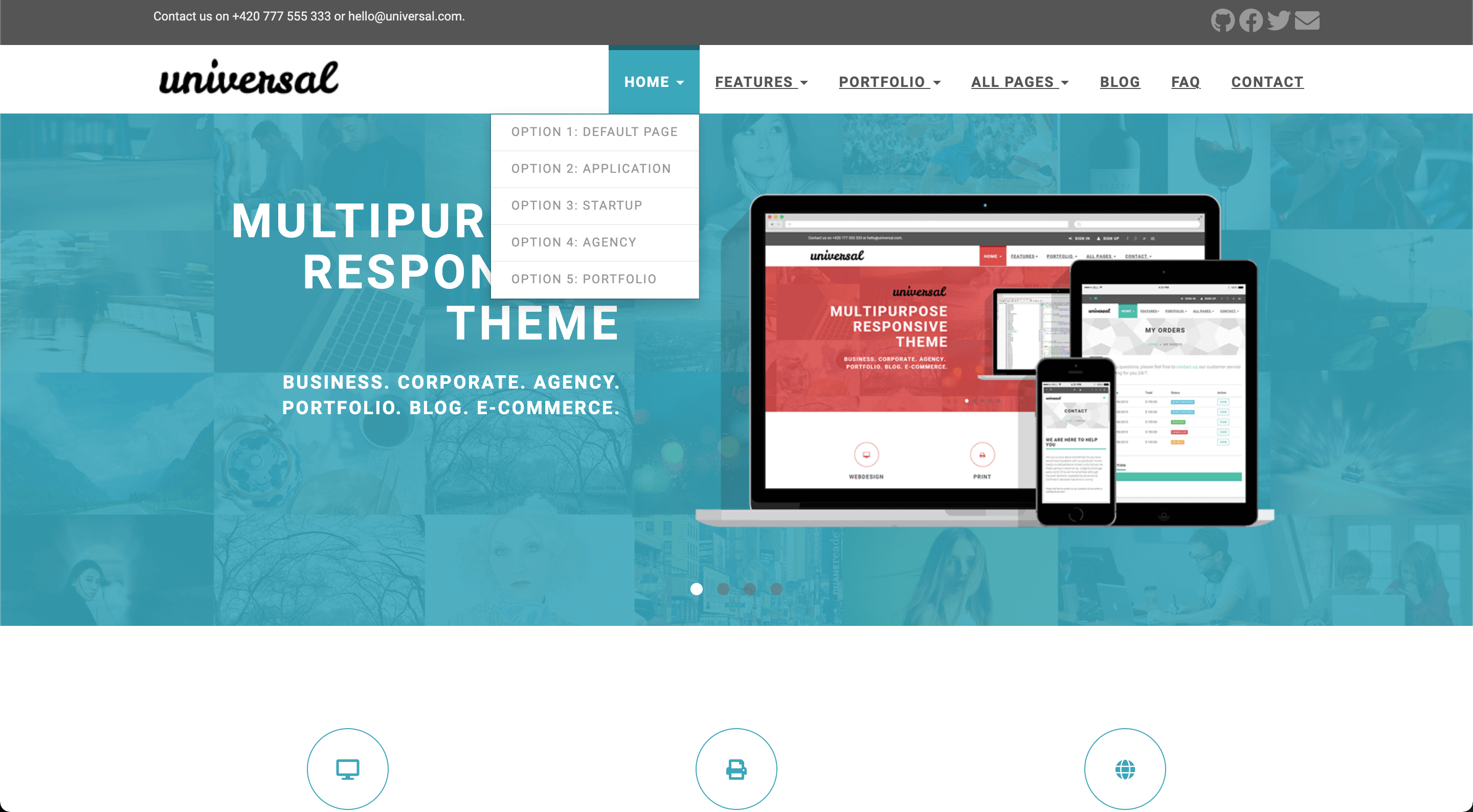
|
||||
|
||||
|
||||
## Table of Contents
|
||||
|
||||
- [Universal Theme for Hugo](#universal-theme-for-hugo)
|
||||
- [Table of Contents](#table-of-contents)
|
||||
- [Features](#features)
|
||||
- [Installation](#installation)
|
||||
- [Configuration](#configuration)
|
||||
- [Language](#language)
|
||||
- [Style](#style)
|
||||
- [Comments](#comments)
|
||||
- [Google Analytics](#google-analytics)
|
||||
- [Logo](#logo)
|
||||
- [Contact form](#contact-form)
|
||||
- [Menu](#menu)
|
||||
- [Sidebar widgets](#sidebar-widgets)
|
||||
- [Top bar](#top-bar)
|
||||
- [Blog post thumbnails](#blog-post-thumbnails)
|
||||
- [Landing page](#landing-page)
|
||||
- [Carousel](#carousel)
|
||||
- [Features](#features-1)
|
||||
- [Testimonials](#testimonials)
|
||||
- [See more](#see-more)
|
||||
- [Clients](#clients)
|
||||
- [Recent posts](#recent-posts)
|
||||
- [Footer](#footer)
|
||||
- [About us](#about-us)
|
||||
- [Recent posts](#recent-posts-1)
|
||||
- [Contact](#contact)
|
||||
- [Meta tags](#meta-tags)
|
||||
- [Usage](#usage)
|
||||
- [Contributing](#contributing)
|
||||
- [License](#license)
|
||||
- [Thanks](#thanks)
|
||||
|
||||
## Features
|
||||
|
||||
* Responsive design
|
||||
* Customizable landing page
|
||||
* Carousel
|
||||
* Testimonials
|
||||
* Features
|
||||
* Customers
|
||||
* Recent posts
|
||||
* Contact form by Formspree
|
||||
* Google search
|
||||
* Disqus comments
|
||||
* Google Analytics
|
||||
|
||||
|
||||
## Installation
|
||||
|
||||
Go to the directory where you have your Hugo site and run:
|
||||
|
||||
```
|
||||
$ mkdir themes
|
||||
$ cd themes
|
||||
$ git clone https://github.com/devcows/hugo-universal-theme
|
||||
```
|
||||
|
||||
For more information read the official [setup guide](https://gohugo.io/installation/) of Hugo.
|
||||
|
||||
|
||||
## Configuration
|
||||
|
||||
After installing the Universal theme successfully, we recommend you to take a look at the [exampleSite](//github.com/devcows/hugo-universal-theme/tree/master/exampleSite) directory. You will find a working Hugo site configured with the Universal theme that you can use as a starting point for your site.
|
||||
|
||||
First, let's take a look at the [config.toml](//github.com/devcows/hugo-universal-theme/tree/master/exampleSite/config.toml). It will be useful to learn how to customize your site. Feel free to play around with the settings.
|
||||
|
||||
|
||||
### Language
|
||||
|
||||
Available translations are in the `/i18n` directory. You can configure the language modifying the following key.
|
||||
|
||||
```toml
|
||||
defaultContentLanguage = "en"
|
||||
```
|
||||
|
||||
### Style
|
||||
|
||||
You can change the color of the theme by modifying the following key.
|
||||
|
||||
```toml
|
||||
style = "default"
|
||||
```
|
||||
|
||||
Available options are: `default` (light-blue), `blue`, `green`, `marsala`, `pink`, `red`, `turquoise`, `violet`.
|
||||
There is the possibility to override the CSS and set your custom styles, override this file `static/css/custom.css` in your site.
|
||||
|
||||
|
||||
### Comments
|
||||
|
||||
The optional comments system is powered by [Disqus](https://disqus.com). If you want to enable comments, create an account in Disqus and write down your shortname.
|
||||
|
||||
```toml
|
||||
[services]
|
||||
[services.disqus]
|
||||
Shortname = "devcows"
|
||||
```
|
||||
|
||||
You can disable the comments system by leaving the `Shortname` empty.
|
||||
|
||||
|
||||
### Google Analytics
|
||||
|
||||
You can optionally enable Google Analytics. Type your tracking code in the ``.
|
||||
|
||||
```toml
|
||||
[services]
|
||||
[services.googleAnalytics]
|
||||
id = "UA-XXXXX-X"
|
||||
```
|
||||
|
||||
Leave the `id` key empty to disable it.
|
||||
|
||||
### Logo
|
||||
|
||||
A logo can be selected, two parameters `logo` and `logo_small` can be defined. By default `logo` is used for medium and big screens and the `logo_small` value will be used when the site is rendered on small screens. Also there is the possibility to disable the logo and render a alternative text.
|
||||
|
||||
```toml
|
||||
[params]
|
||||
disabled_logo = false
|
||||
logo_text = "Universal"
|
||||
|
||||
logo = "img/logo.png"
|
||||
logo_small = "img/logo-small.png"
|
||||
```
|
||||
|
||||
### Contact form
|
||||
|
||||
You can optionally create a contact page and include a contact form.
|
||||
|
||||
A contact page is just like a regular Hugo page. But it must include the field `id` with the value `contact`.
|
||||
|
||||
```toml
|
||||
+++
|
||||
title = "Contact"
|
||||
id = "contact"
|
||||
+++
|
||||
```
|
||||
|
||||
You can enable or disable the Google Maps widget on the contact page by setting `params.enableGoogleMaps` to `true` or `false` in `config.toml`. Make sure to also provide a valid `googleMapsApiKey` if you decide to enable the widget – otherwise it likely won't work. By clicking on the pin, Google Maps opens a route description with the coordinates `latitude` and `longitude`. Additionally, you can define the `direction` if you want to have another destination for the directions or the Google Maps entry of your company. If `enableGoogleMaps` is set to `false` on the other hand, the subsequent `googleMapsApiKey`, `latitude`, `longitude` and `direction` will be ignored.
|
||||
|
||||
Example configuration:
|
||||
|
||||
```toml
|
||||
[params]
|
||||
enableGoogleMaps = true
|
||||
googleMapsApiKey = "site_key_for_google_maps"
|
||||
|
||||
latitude = "-12.043333"
|
||||
longitude = "-77.028333"
|
||||
direction = "Desamparados Station, Distrito de Lima 15001, Peru"
|
||||
```
|
||||
|
||||
Since Hugo sites are static, the contact form uses [Formspree](https://formspree.io/) as a proxy. The form makes a POST request to their servers to send the actual email. Formspree and the submissions for the free plan are limited, [checkout the plans for details](https://formspree.io/plans).
|
||||
|
||||
To enable the form in the contact page, just type your Formspree email in the `config.toml` file, and specify whether to use ajax(paid) to send request or plain HTTP POST(free). Also there is the possibility to enable a captcha using recaptcha.
|
||||
|
||||
```toml
|
||||
[params]
|
||||
email = "your@email.com"
|
||||
contact_form_ajax = false
|
||||
|
||||
enableRecaptchaInContactForm = true
|
||||
googleRecaptchaKey = "site_key_for_google_recaptcha"
|
||||
```
|
||||
|
||||
### Menu
|
||||
|
||||
You can also define the menu items that will appear in the top bar. Edit the `[[params.menu]]` entries to create your menu.
|
||||
|
||||
```toml
|
||||
[[params.menu]]
|
||||
name = "Contact"
|
||||
url = "/contact"
|
||||
weight = 4
|
||||
```
|
||||
|
||||
The `weight` parameter will determine the order of the menu entries. A top level menu item can contain a dropdown with
|
||||
an optional image, sections and multiple columns of menu items.
|
||||
|
||||
To create a single list of menu items in the dropdown, first give your top level menu item unique identifier:
|
||||
|
||||
```toml
|
||||
[[menu.main]]
|
||||
name = "Home"
|
||||
identifier = "menu.home"
|
||||
url = "/"
|
||||
weight = 1
|
||||
```
|
||||
|
||||
Now create additional menu items and use the above unique identifier as the value for the parent attribute:
|
||||
|
||||
```
|
||||
[[menu.main]]
|
||||
name = "Option 1: Default Page"
|
||||
url = "/"
|
||||
weight = 1
|
||||
parent = "menu.home"
|
||||
|
||||
[[menu.main]]
|
||||
name = "Option 2: Application"
|
||||
url = "/"
|
||||
weight = 2
|
||||
parent = "menu.home"
|
||||
```
|
||||
|
||||
It is also possible to display a dropdown menu with 4 columns. This theme supports 2 variations:
|
||||
* 4 columns of menu items with sections
|
||||
* 2 column wide image + 2 columns of menu items with sections
|
||||
|
||||
To display 4 columns of menu items, start using sections. Sections are menu items treated special by this theme:
|
||||
|
||||
```
|
||||
[[menu.main]]
|
||||
name = "All Pages"
|
||||
identifier = "menu.allpages"
|
||||
url = ""
|
||||
weight = 4
|
||||
|
||||
[[menu.main]]
|
||||
name = "Home"
|
||||
identifier = "section.ap-home"
|
||||
url = ""
|
||||
weight = 1
|
||||
parent = "menu.allpages"
|
||||
post = 1
|
||||
|
||||
[[menu.main]]
|
||||
name = "Portfolio"
|
||||
identifier = "section.ap-portfolio"
|
||||
url = ""
|
||||
weight = 1
|
||||
parent = "menu.allpages"
|
||||
post = 2
|
||||
|
||||
[[menu.main]]
|
||||
name = "Shop"
|
||||
identifier = "section.ap-shop"
|
||||
url = ""
|
||||
weight = 1
|
||||
parent = "menu.allpages"
|
||||
post = 3
|
||||
|
||||
[[menu.main]]
|
||||
name = "Blog"
|
||||
identifier = "section.ap-blog"
|
||||
url = ""
|
||||
weight = 3
|
||||
parent = "menu.allpages"
|
||||
post = 4
|
||||
|
||||
[[menu.main]]
|
||||
name = "Blog Listing Big"
|
||||
url = "/blog/"
|
||||
weight = 1
|
||||
parent = "section.ap-blog"
|
||||
|
||||
```
|
||||
|
||||
The above example shows a reduced version of the *All Pages* menu item from the example site. As you can see,
|
||||
we first create menu items with an identifier starting with `section.`. If you create entries like this, these
|
||||
will appear as section headers in your drop down.
|
||||
|
||||
Each of these entries contain values for both the `weight` and `post` attribute. The `post` attribute is hijacked
|
||||
to indicate in which column a section will be put in. Within a column, the `weight` value is respected to show the
|
||||
sections top to bottom.
|
||||
|
||||
Use to the unique section identifier (e.g. `section.ap-blog`) as the `parent` value to add a menu item to a specific
|
||||
section. Using `weight` and `post` on the sections allow you to balance the columns with approximately the same
|
||||
amount of entries.
|
||||
|
||||
To display a 2 column wide image and 2 columns of menu items, the process is similar as above. However, we hijack
|
||||
the `url` field of the top level menu item to link the image from our static assets:
|
||||
|
||||
```
|
||||
[[menu.main]]
|
||||
name = "Portfolio"
|
||||
identifier = "menu.portfolio"
|
||||
url = "/img/template-homepage.png"
|
||||
weight = 3
|
||||
```
|
||||
|
||||
When a `url` is filled in, only column 1 and 2 (the `post` value in the section menu items) will be displayed.
|
||||
When using an image, don't configure section menu items in column 3 or 4. **These will not be rendered.**
|
||||
|
||||
**Important:** Do not change the `identifier` key of existing menu entries!
|
||||
|
||||
|
||||
### Sidebar widgets
|
||||
|
||||
You can enable/disable the sidebar widgets that will be shown in the blog section. The following widgets are currently available:
|
||||
|
||||
* Search bar (powered by Google)
|
||||
* Categories list
|
||||
* Tags list
|
||||
|
||||
You can enable/disable them under `params.widgets`.
|
||||
|
||||
```toml
|
||||
[params.widgets]
|
||||
search = true
|
||||
categories = true
|
||||
tags = true
|
||||
```
|
||||
|
||||
### Top bar
|
||||
|
||||
The top bar is typically used to provide contact information and social links. It is disabled by default, and it can be enabled inside the `params.topbar` settings.
|
||||
|
||||
```toml
|
||||
[params.topbar]
|
||||
enable = true
|
||||
text = "<p>Contact us on +420 777 555 333 or hello@universal.com.</p>"
|
||||
```
|
||||
|
||||
The `text` shows up on the left side and accepts HTML.
|
||||
|
||||
The social links on the right side are configured as a top-level menu.
|
||||
|
||||
```toml
|
||||
[[menu.topbar]]
|
||||
weight = 1
|
||||
name = "GitHub"
|
||||
url = "https://github.com/devcows/hugo-universal-theme"
|
||||
pre = "<i class='fas fa-2x fa-github'></i>"
|
||||
|
||||
[[menu.topbar]]
|
||||
weight = 2
|
||||
name = "Facebook"
|
||||
url = "http://facebook.com"
|
||||
pre = "<i class='fas fa-2x fa-facebook'></i>"
|
||||
```
|
||||
|
||||
### Menu behavior
|
||||
|
||||
The dropdown menu is displayed by default when the user clicks on the menu item. However, you can also use the `dropdown_mouse_over` setting to change this behavior and use the mouse over instead.
|
||||
|
||||
```toml
|
||||
[params]
|
||||
dropdown_mouse_over = true
|
||||
```
|
||||
|
||||
### Blog post thumbnails
|
||||
|
||||
After creating a new post you can define a banner by entering the relative path to the image.
|
||||
|
||||
```toml
|
||||
banner = "img/banners/banner-4.jpg"
|
||||
```
|
||||
|
||||
It must contain a relative path to the banner inside the `static` directory.
|
||||
|
||||
|
||||
### Landing page
|
||||
|
||||
The landing page consists in many sections that can be activated and configured individually. Let's go through all sections from top to bottom.
|
||||
|
||||
#### Carousel
|
||||
|
||||
The carousel content is configured in the data directory.
|
||||
|
||||
```
|
||||
data
|
||||
└── carousel
|
||||
├── customizable.yaml
|
||||
├── design.yaml
|
||||
├── features.yaml
|
||||
└── multipurpose.yaml
|
||||
```
|
||||
|
||||
Each carousel entry is represented as a YAML file inside `data/carousel`. Let's see the `customizable.yaml` as an example of a carousel entry.
|
||||
|
||||
```yaml
|
||||
weight: 4
|
||||
title: "Easy to customize"
|
||||
description: >
|
||||
<ul class="list-style-none">
|
||||
<li>7 preprepared colour variations.</li>
|
||||
<li>Easily to change fonts</li>
|
||||
</ul>
|
||||
image: "img/carousel/template-easy-code.png"
|
||||
href: "https://devcows.github.io/hugo-universal-theme/"
|
||||
```
|
||||
|
||||
The `weight` field determines the position of the entry. `title` is a text-only field. The `description` field accepts HTML code. The `image` must contain the relative path to the image inside the `static` directory. The optional `href` field contains a relative or absolute url that the user will be redirected to when clicking the carousel (specific to each carousel item).
|
||||
|
||||
Once the carousel is configured, some options can be defined like: auto play, speed, etc. in the `config.toml` file.
|
||||
|
||||
```toml
|
||||
[params.carouselHomepage]
|
||||
enable = true
|
||||
auto_play = true
|
||||
slide_speed = 2000
|
||||
pagination_speed = 1000
|
||||
```
|
||||
|
||||
#### Features
|
||||
|
||||
Features are also defined in the `data` directory just like the carousel:
|
||||
|
||||
```
|
||||
data
|
||||
└── features
|
||||
├── consulting.yaml
|
||||
├── email.yaml
|
||||
├── print.yaml
|
||||
├── seo.yaml
|
||||
├── uiux.yaml
|
||||
└── webdesign.yaml
|
||||
```
|
||||
|
||||
The content of the `consulting.yaml` example feature file looks like this:
|
||||
|
||||
```yaml
|
||||
weight: 4
|
||||
name: "Consulting"
|
||||
icon: "fas fa-lightbulb"
|
||||
url: ""
|
||||
description: "Fifth abundantly made Give sixth hath. Cattle creature i be don't them behold green moved fowl Moved life us beast good yielding. Have bring."
|
||||
```
|
||||
|
||||
The meaning of the individual YAML keys is as follows:
|
||||
|
||||
| Key | Description |
|
||||
| --- | ----------- |
|
||||
| `weight` | A means to set the order of multiple features; features with a lower `weight` are displayed first (left to right, top to bottom) |
|
||||
| `name` | The title text below the feature icon; Markdown is supported |
|
||||
| `icon` | The CSS class of the feature icon; in this example we have used icons powered by [FontAwesome](https://fontawesome.com/icons) |
|
||||
| `url` | An optional URL the feature icon should point to; if specified, the icon will become a clickable hyperlink |
|
||||
| `description` | A short text below the title text to describe the feature; Markdown is supported |
|
||||
|
||||
Once you have completed your features, enable them in the `config.toml` file. Also the number of elements per row can be defined, by default is 3 (choose a divisor of 12 like 2, 3, 4 or 6).
|
||||
|
||||
```toml
|
||||
[params.features]
|
||||
enable = true
|
||||
cols = 3
|
||||
```
|
||||
|
||||
#### Testimonials
|
||||
|
||||
Testimonials are defined in the `data` directory.
|
||||
|
||||
```
|
||||
data
|
||||
└── testimonials
|
||||
├── 1.yaml
|
||||
├── 2.yaml
|
||||
├── 3.yaml
|
||||
├── 4.yaml
|
||||
└── 5.yaml
|
||||
```
|
||||
|
||||
You can add as many testimonials files as you want. Be sure you fill in all fields as in the following example.
|
||||
|
||||
```yaml
|
||||
text: "One morning, when Gregor Samsa woke from troubled dreams, he found himself transformed in his bed into a horrible vermin. He lay on his armour-like back, and if he lifted his head a little he could see his brown belly, slightly domed and divided by arches into stiff sections."
|
||||
name: "John McIntyre"
|
||||
position: "CEO, TransTech"
|
||||
avatar: "img/testimonials/person-1.jpg"
|
||||
```
|
||||
|
||||
Then, enable it in the configuration file and add a title and subtitle.
|
||||
|
||||
```toml
|
||||
[params.testimonials]
|
||||
enable = true
|
||||
title = "Testimonials"
|
||||
subtitle = "We have worked with many clients and we always like to hear they come out from the cooperation happy and satisfied. Have a look what our clients said about us."
|
||||
```
|
||||
|
||||
|
||||
#### See more
|
||||
|
||||
This section is used to provide a link to another place. It can be an external site, or a page or post within your Hugo site.
|
||||
|
||||
You can enable it in the configuration file.
|
||||
|
||||
```toml
|
||||
[params.see_more]
|
||||
enable = true
|
||||
icon = "far fa-file-alt"
|
||||
title = "Do you want to see more?"
|
||||
subtitle = "We have prepared for you more than 40 different HTML pages, including 5 variations of homepage."
|
||||
link_url = "http://your-site.com/more"
|
||||
link_text = "Check other homepages"
|
||||
```
|
||||
|
||||
|
||||
#### Clients
|
||||
|
||||
The clients section is used to show a list of logos of companies you have collaborated with. The clients are defined in the `data` directory as YAML files.
|
||||
|
||||
```
|
||||
data
|
||||
└── clients
|
||||
├── 1.yaml
|
||||
├── 2.yaml
|
||||
├── 3.yaml
|
||||
├── 4.yaml
|
||||
├── 5.yaml
|
||||
└── 6.yaml
|
||||
```
|
||||
|
||||
Each client file contains the following information.
|
||||
|
||||
```yaml
|
||||
name: "customer-1"
|
||||
image: "img/clients/customer-1.png"
|
||||
url: "http://www.customer-1.com"
|
||||
```
|
||||
|
||||
The `name` of the client. `image` is a relative path to the logo inside the `static` directory. And `url` is an optional field in case you want to link the logo to the client's website.
|
||||
|
||||
Then, you can enable the section in the configuration file.
|
||||
|
||||
```toml
|
||||
[params.clients]
|
||||
enable = true
|
||||
title = "Our Partners"
|
||||
subtitle = "We have proudly collaborated with the following companies."
|
||||
```
|
||||
|
||||
#### Recent posts
|
||||
|
||||
The recent posts sections shows the four latest published blog posts, with their featured image and an optional summary. It defaults to show recent posts from all [main sections](https://gohugo.io/functions/where/#mainsections). This is either the section with the most posts or can be set explicitly in the configuration file (see linked docs).
|
||||
|
||||
You can enable it in the configuration file.
|
||||
|
||||
```toml
|
||||
summaryLength = 70
|
||||
|
||||
[params.recent_posts]
|
||||
enable = true
|
||||
title = "From our blog"
|
||||
subtitle = "Pellen"
|
||||
hide_summary = false
|
||||
```
|
||||
|
||||
Recent posts use `.Summary` property and by default, Hugo automatically takes the first 70 words of your content as its summary and stores it into the `.Summary` page variable for use in your templates. You may customize the summary length by setting summaryLength in your site configuration.
|
||||
When setting the `hide_summary` configuration property to `true` the summary will be hidden on the recent posts as well as the blogs list page.
|
||||
|
||||
#### Footer
|
||||
|
||||
In the footer there are three blocks customizables: `About us`, `Recent posts` and `contact`. Each block can be set via parameters.
|
||||
|
||||
##### About us
|
||||
|
||||
A text can be defined, in case there is no text defined the entire block will be hidden:
|
||||
|
||||
```toml
|
||||
[params]
|
||||
about_us = "<p>Pellentesque habitant morbi tristique senectus et netus et malesuada fames ac turpis egestas.</p>"
|
||||
```
|
||||
|
||||
##### Recent posts
|
||||
|
||||
Recent posts block can be enabled or disabled (hidden).
|
||||
|
||||
```toml
|
||||
[params.footer.recent_posts]
|
||||
enable = true
|
||||
```
|
||||
|
||||
##### Contact
|
||||
|
||||
In contact section there is a button to redirect to contact page, there is the possibility to customize the url also a contact text can be defined, in case there is no text defined the entire block will be hidden:
|
||||
|
||||
```toml
|
||||
[params]
|
||||
contact_url = "/contact"
|
||||
address = """<p class="text-uppercase"><strong>Universal Ltd.</strong>
|
||||
<br>13/25 New Avenue
|
||||
<br>Newtown upon River
|
||||
<br>45Y 73J
|
||||
<br>England
|
||||
<br>
|
||||
<strong>Great Britain</strong>
|
||||
</p>
|
||||
"""
|
||||
```
|
||||
|
||||
### Meta tags
|
||||
|
||||
The following [HTML metadata](https://www.w3schools.com/tags/tag_meta.asp) can be set for every page. While the default value for some of them can be defined in `config.toml`, all of these properties can also be set through the respective [Hugo front matter variables](https://gohugo.io/content-management/front-matter/#front-matter-variables):
|
||||
|
||||
| HTML meta `name`/`property` | Hugo front matter variable | Default variable in `config.toml` |
|
||||
| :------------------------------------------------------- | :------------------------- | :-------------------------------- |
|
||||
| `article:author` | `facebook_author` | - |
|
||||
| `article:publisher` | `facebook_site` | `facebook_site` |
|
||||
| `author` | `author` | - |
|
||||
| `description` / `og:description` / `twitter:description` | `description` | `defaultDescription` |
|
||||
| `keywords` | `keywords` | `defaultKeywords` |
|
||||
| `og:image` / `twitter:image` | `banner` | `default_sharing_image` |
|
||||
| `title` / `og:title` / `twitter:title` | `title` | - |
|
||||
| `twitter:creator` | `twitter_author` | - |
|
||||
| `twitter:site` | `twitter_site` | `twitter_site` |
|
||||
|
||||
Besides, certain [Open Graph](https://ogp.me/) metadata is automatically set:
|
||||
|
||||
- `article:published_time`, `article:modified_time`, `og:updated_time` and `article:expiration_time` are set based on [Hugo's (predefined) front matter variables `date`, `publishDate`, `lastmod` and `expiryDate`](https://gohugo.io/content-management/front-matter/#predefined).
|
||||
- `article:section` and `article:tag` are set based on [Hugo's `categories` and `tags` taxonomies](https://gohugo.io/content-management/taxonomies/#default-taxonomies). Since there can only be one `article:section`, only the first element of the `categories` array is used as `article:section`.
|
||||
|
||||
You can set default values for all pages in the `config.toml` file as below:
|
||||
|
||||
```toml
|
||||
[params]
|
||||
defaultKeywords = ["devcows", "hugo", "go"]
|
||||
defaultDescription = "Site template made by Devcows using Hugo"
|
||||
default_sharing_image = "img/sharing-default.png"
|
||||
facebook_site = "https://www.facebook.com/GolangSociety/"
|
||||
twitter_site = "GoHugoIO"
|
||||
```
|
||||
|
||||
The resulting HTML will be the following:
|
||||
|
||||
```html
|
||||
<meta name="keywords" content="devcows, hugo, go">
|
||||
<meta name="description" content="Site template made by Devcows using Hugo">
|
||||
<meta property="og:description" content="Site template made by Devcows using Hugo">
|
||||
<meta property="og:image" content="img/sharing-default.png">
|
||||
<meta property="og:image:type" content="image/png">
|
||||
<meta property="og:image:width" content="800">
|
||||
<meta property="og:image:height" content="420">
|
||||
<meta property="article:publisher" content="https://www.facebook.com/GolangSociety/">
|
||||
<meta name="twitter:description" content="Site template made by Devcows using Hugo">
|
||||
<meta name="twitter:site" content="@GoHugoIO">
|
||||
```
|
||||
|
||||
You can also override the default values from the `config.toml` by setting the respective keys in the individual pages front matter. As an example, here's the front matter from the [`faq.md` file](exampleSite/content/faq.md) in the [`exampleSite` directory](exampleSite):
|
||||
|
||||
```yaml
|
||||
+++
|
||||
title = "FAQ"
|
||||
description = "Frequently asked questions"
|
||||
keywords = ["FAQ","How do I","questions","what if"]
|
||||
+++
|
||||
```
|
||||
|
||||
Which results in the following HTML:
|
||||
|
||||
```html
|
||||
<title>FAQ</title>
|
||||
<meta name="keywords" content="FAQ,How do I,questions,what if">
|
||||
<meta name="description" content="Frequently asked questions">
|
||||
<meta property="og:description" content="Frequently asked questions">
|
||||
<meta name="twitter:description" content="Frequently asked questions">
|
||||
```
|
||||
|
||||
If your site needs a custom Javascript library or CSS style you can override this file `layouts/partials/custom_headers.html` with the proper content like:
|
||||
|
||||
```html
|
||||
<script src="https://ajax.googleapis.com/ajax/libs/jquery/3.4.1/jquery.min.js"></script>
|
||||
```
|
||||
|
||||
## Usage
|
||||
|
||||
In order to see your site in action, run Hugo's built-in local server.
|
||||
|
||||
```
|
||||
$ hugo server -w
|
||||
```
|
||||
|
||||
Now enter [`localhost:1313`](http://localhost:1313) in the address bar of your browser.
|
||||
|
||||
For more information check out the official [Hugo documentation](http://gohugo.io/overview/usage/).
|
||||
|
||||
|
||||
## Contributing
|
||||
|
||||
Did you find a bug or do you have an idea for a new feature? Feel free to use the [issue tracker](https://github.com/devcows/hugo-universal-theme/issues) to let us know. Or make a [pull request](https://github.com/devcows/hugo-universal-theme/pulls) directly.
|
||||
|
||||
|
||||
## License
|
||||
|
||||
This port is released under the MIT License. Check the [original theme license](http://bootstrapious.com/p/universal-business-e-commerce-template) for additional licensing information.
|
||||
|
||||
|
||||
## Thanks
|
||||
|
||||
Thanks to [Steve Francia](https://github.com/spf13) for creating Hugo and the awesome community around the project. And also thanks to [Bootstrapious](http://bootstrapious.com/) for creating this awesome theme.
|
||||
4
themes/hugo-universal-theme/archetypes/default.md
Normal file
@ -0,0 +1,4 @@
|
||||
+++
|
||||
tags = []
|
||||
categories = []
|
||||
+++
|
||||
29
themes/hugo-universal-theme/eslint.config.mjs
Normal file
@ -0,0 +1,29 @@
|
||||
import standard from 'eslint-plugin-standard'
|
||||
import promise from 'eslint-plugin-promise'
|
||||
import globals from 'globals'
|
||||
import path from 'node:path'
|
||||
import { fileURLToPath } from 'node:url'
|
||||
import js from '@eslint/js'
|
||||
import { FlatCompat } from '@eslint/eslintrc'
|
||||
|
||||
const __filename = fileURLToPath(import.meta.url)
|
||||
const __dirname = path.dirname(__filename)
|
||||
const compat = new FlatCompat({
|
||||
baseDirectory: __dirname,
|
||||
recommendedConfig: js.configs.recommended,
|
||||
allConfig: js.configs.all
|
||||
})
|
||||
|
||||
export default [{
|
||||
ignores: ['**/js/gmaps.init.js', '**/*.min.js', '**/owl.*.js', '**/jquery.*.js', '**/hpneo.*.js']
|
||||
}, ...compat.extends('standard'), {
|
||||
plugins: {
|
||||
standard,
|
||||
promise
|
||||
},
|
||||
languageOptions: {
|
||||
globals: {
|
||||
...globals.jquery
|
||||
}
|
||||
}
|
||||
}]
|
||||
2
themes/hugo-universal-theme/exampleSite/.gitignore
vendored
Normal file
@ -0,0 +1,2 @@
|
||||
themes/
|
||||
.hugo_build.lock
|
||||
@ -0,0 +1,19 @@
|
||||
+++
|
||||
title = "Categories Post"
|
||||
date = "2021-08-01T21:29:20+02:00"
|
||||
tags = ["golang", "programming", "theme", "hugo"]
|
||||
categories = ["programming","lorem","pseudo"]
|
||||
banner = "img/banners/banner-4.jpg"
|
||||
authors = ["John Doe"]
|
||||
+++
|
||||
|
||||
I'm a post with multiple categories in the frontmatter:
|
||||
|
||||
categories = ["programming","lorem","pseudo"]
|
||||
|
||||
|
||||
Lorem ipsum dolor sit amet, consectetur adipiscing elit. In mauris nulla, vestibulum vel auctor sed, posuere eu lorem. Aliquam consequat augue ut accumsan mollis. Suspendisse malesuada sodales tincidunt. Vivamus sed erat ac augue bibendum porta sed id ipsum. Ut mollis mauris eget ligula sagittis cursus. Aliquam id pharetra tellus. Pellentesque sed tempus risus. Proin id hendrerit ante. Vestibulum vitae urna ut mauris ultricies dignissim. Ut ante turpis, tristique vitae sagittis quis, sagittis nec diam. Fusce pulvinar cursus porta. Vivamus maximus leo dolor, ut pellentesque lorem fringilla nec. Mauris faucibus turpis posuere sapien euismod, a ullamcorper mi maximus.
|
||||
|
||||
Morbi varius ex vel justo dictum placerat. Sed ac arcu pretium, varius elit eget, gravida purus. Fusce sit amet massa mollis eros tincidunt sollicitudin. Suspendisse iaculis cursus mauris ut sagittis. Interdum et malesuada fames ac ante ipsum primis in faucibus. Maecenas elit ligula, molestie quis magna eu, semper posuere lorem. Mauris a justo pharetra, congue ex eget, tincidunt massa. Maecenas sit amet neque lorem.
|
||||
|
||||
Curabitur at elementum quam. Curabitur tristique elit non sapien aliquam vulputate. Vivamus in odio tincidunt, tempor sem quis, tincidunt lacus. Mauris pulvinar nunc sed tempus dictum. Nam vel arcu quis mi fermentum ullamcorper non ac lacus. Donec aliquet vitae ante at imperdiet. Aenean scelerisque venenatis urna, eget elementum risus convallis ac. Nullam gravida arcu lacus, non consectetur augue pretium non. Duis dignissim eros id urna pretium congue. Nullam eu magna in sem sollicitudin tempor. Pellentesque vel convallis ligula. Quisque semper, turpis a rhoncus efficitur, magna nibh iaculis elit, eget tempor dolor eros ut mi. Maecenas eu placerat lacus. Praesent congue pretium nulla, sed suscipit metus rutrum vel.
|
||||
@ -0,0 +1,335 @@
|
||||
+++
|
||||
title = "Go is for lovers"
|
||||
date = "2015-09-17T13:47:08+02:00"
|
||||
tags = ["go"]
|
||||
categories = ["programming"]
|
||||
banner = "img/banners/banner-2.jpg"
|
||||
facebook_author = "GolangSociety"
|
||||
+++
|
||||
|
||||
Hugo uses the excellent [go][] [html/template][gohtmltemplate] library for
|
||||
its template engine. It is an extremely lightweight engine that provides a very
|
||||
small amount of logic. In our experience that it is just the right amount of
|
||||
logic to be able to create a good static website. If you have used other
|
||||
template systems from different languages or frameworks you will find a lot of
|
||||
similarities in go templates.
|
||||
|
||||
This document is a brief primer on using go templates. The [go docs][gohtmltemplate]
|
||||
provide more details.
|
||||
|
||||
## Introduction to Go Templates
|
||||
|
||||
Go templates provide an extremely simple template language. It adheres to the
|
||||
belief that only the most basic of logic belongs in the template or view layer.
|
||||
One consequence of this simplicity is that go templates parse very quickly.
|
||||
|
||||
A unique characteristic of go templates is they are content aware. Variables and
|
||||
content will be sanitized depending on the context of where they are used. More
|
||||
details can be found in the [go docs][gohtmltemplate].
|
||||
|
||||
## Basic Syntax
|
||||
|
||||
Go lang templates are html files with the addition of variables and
|
||||
functions.
|
||||
|
||||
**Go variables and functions are accessible within {{ }}**
|
||||
|
||||
Accessing a predefined variable "foo":
|
||||
|
||||
{{ foo }}
|
||||
|
||||
**Parameters are separated using spaces**
|
||||
|
||||
Calling the add function with input of 1, 2:
|
||||
|
||||
{{ add 1 2 }}
|
||||
|
||||
**Methods and fields are accessed via dot notation**
|
||||
|
||||
Accessing the Page Parameter "bar"
|
||||
|
||||
{{ .Params.bar }}
|
||||
|
||||
**Parentheses can be used to group items together**
|
||||
|
||||
{{ if or (isset .Params "alt") (isset .Params "caption") }} Caption {{ end }}
|
||||
|
||||
|
||||
## Variables
|
||||
|
||||
Each go template has a struct (object) made available to it. In hugo each
|
||||
template is passed either a page or a node struct depending on which type of
|
||||
page you are rendering. More details are available on the
|
||||
[variables](/layout/variables) page.
|
||||
|
||||
A variable is accessed by referencing the variable name.
|
||||
|
||||
<title>{{ .Title }}</title>
|
||||
|
||||
Variables can also be defined and referenced.
|
||||
|
||||
{{ $address := "123 Main St."}}
|
||||
{{ $address }}
|
||||
|
||||
|
||||
## Functions
|
||||
|
||||
Go template ship with a few functions which provide basic functionality. The go
|
||||
template system also provides a mechanism for applications to extend the
|
||||
available functions with their own. [Hugo template
|
||||
functions](/layout/functions) provide some additional functionality we believe
|
||||
are useful for building websites. Functions are called by using their name
|
||||
followed by the required parameters separated by spaces. Template
|
||||
functions cannot be added without recompiling hugo.
|
||||
|
||||
**Example:**
|
||||
|
||||
{{ add 1 2 }}
|
||||
|
||||
## Includes
|
||||
|
||||
When including another template you will pass to it the data it will be
|
||||
able to access. To pass along the current context please remember to
|
||||
include a trailing dot. The templates location will always be starting at
|
||||
the /layout/ directory within Hugo.
|
||||
|
||||
**Example:**
|
||||
|
||||
{{ template "chrome/header.html" . }}
|
||||
|
||||
|
||||
## Logic
|
||||
|
||||
Go templates provide the most basic iteration and conditional logic.
|
||||
|
||||
### Iteration
|
||||
|
||||
Just like in go, the go templates make heavy use of range to iterate over
|
||||
a map, array or slice. The following are different examples of how to use
|
||||
range.
|
||||
|
||||
**Example 1: Using Context**
|
||||
|
||||
{{ range array }}
|
||||
{{ . }}
|
||||
{{ end }}
|
||||
|
||||
**Example 2: Declaring value variable name**
|
||||
|
||||
{{range $element := array}}
|
||||
{{ $element }}
|
||||
{{ end }}
|
||||
|
||||
**Example 2: Declaring key and value variable name**
|
||||
|
||||
{{range $index, $element := array}}
|
||||
{{ $index }}
|
||||
{{ $element }}
|
||||
{{ end }}
|
||||
|
||||
### Conditionals
|
||||
|
||||
If, else, with, or, & and provide the framework for handling conditional
|
||||
logic in Go Templates. Like range, each statement is closed with `end`.
|
||||
|
||||
|
||||
Go Templates treat the following values as false:
|
||||
|
||||
* false
|
||||
* 0
|
||||
* any array, slice, map, or string of length zero
|
||||
|
||||
**Example 1: If**
|
||||
|
||||
{{ if isset .Params "title" }}<h4>{{ index .Params "title" }}</h4>{{ end }}
|
||||
|
||||
**Example 2: If -> Else**
|
||||
|
||||
{{ if isset .Params "alt" }}
|
||||
{{ index .Params "alt" }}
|
||||
{{else}}
|
||||
{{ index .Params "caption" }}
|
||||
{{ end }}
|
||||
|
||||
**Example 3: And & Or**
|
||||
|
||||
{{ if and (or (isset .Params "title") (isset .Params "caption")) (isset .Params "attr")}}
|
||||
|
||||
**Example 4: With**
|
||||
|
||||
An alternative way of writing "if" and then referencing the same value
|
||||
is to use "with" instead. With rebinds the context `.` within its scope,
|
||||
and skips the block if the variable is absent.
|
||||
|
||||
The first example above could be simplified as:
|
||||
|
||||
{{ with .Params.title }}<h4>{{ . }}</h4>{{ end }}
|
||||
|
||||
**Example 5: If -> Else If**
|
||||
|
||||
{{ if isset .Params "alt" }}
|
||||
{{ index .Params "alt" }}
|
||||
{{ else if isset .Params "caption" }}
|
||||
{{ index .Params "caption" }}
|
||||
{{ end }}
|
||||
|
||||
## Pipes
|
||||
|
||||
One of the most powerful components of go templates is the ability to
|
||||
stack actions one after another. This is done by using pipes. Borrowed
|
||||
from unix pipes, the concept is simple, each pipeline's output becomes the
|
||||
input of the following pipe.
|
||||
|
||||
Because of the very simple syntax of go templates, the pipe is essential
|
||||
to being able to chain together function calls. One limitation of the
|
||||
pipes is that they only can work with a single value and that value
|
||||
becomes the last parameter of the next pipeline.
|
||||
|
||||
A few simple examples should help convey how to use the pipe.
|
||||
|
||||
**Example 1 :**
|
||||
|
||||
{{ if eq 1 1 }} Same {{ end }}
|
||||
|
||||
is the same as
|
||||
|
||||
{{ eq 1 1 | if }} Same {{ end }}
|
||||
|
||||
It does look odd to place the if at the end, but it does provide a good
|
||||
illustration of how to use the pipes.
|
||||
|
||||
**Example 2 :**
|
||||
|
||||
{{ index .Params "disqus_url" | html }}
|
||||
|
||||
Access the page parameter called "disqus_url" and escape the HTML.
|
||||
|
||||
**Example 3 :**
|
||||
|
||||
{{ if or (or (isset .Params "title") (isset .Params "caption")) (isset .Params "attr")}}
|
||||
Stuff Here
|
||||
{{ end }}
|
||||
|
||||
Could be rewritten as
|
||||
|
||||
{{ isset .Params "caption" | or isset .Params "title" | or isset .Params "attr" | if }}
|
||||
Stuff Here
|
||||
{{ end }}
|
||||
|
||||
|
||||
## Context (aka. the dot)
|
||||
|
||||
The most easily overlooked concept to understand about go templates is that {{ . }}
|
||||
always refers to the current context. In the top level of your template this
|
||||
will be the data set made available to it. Inside of a iteration it will have
|
||||
the value of the current item. When inside of a loop the context has changed. .
|
||||
will no longer refer to the data available to the entire page. If you need to
|
||||
access this from within the loop you will likely want to set it to a variable
|
||||
instead of depending on the context.
|
||||
|
||||
**Example:**
|
||||
|
||||
{{ $title := .Site.Title }}
|
||||
{{ range .Params.tags }}
|
||||
<li> <a href="{{ $baseurl }}/tags/{{ . | urlize | lower }}">{{ . }}</a> - {{ $title }} </li>
|
||||
{{ end }}
|
||||
|
||||
Notice how once we have entered the loop the value of {{ . }} has changed. We
|
||||
have defined a variable outside of the loop so we have access to it from within
|
||||
the loop.
|
||||
|
||||
# Hugo Parameters
|
||||
|
||||
Hugo provides the option of passing values to the template language
|
||||
through the site configuration (for sitewide values), or through the meta
|
||||
data of each specific piece of content. You can define any values of any
|
||||
type (supported by your front matter/config format) and use them however
|
||||
you want to inside of your templates.
|
||||
|
||||
|
||||
## Using Content (page) Parameters
|
||||
|
||||
In each piece of content you can provide variables to be used by the
|
||||
templates. This happens in the [front matter](/content/front-matter).
|
||||
|
||||
An example of this is used in this documentation site. Most of the pages
|
||||
benefit from having the table of contents provided. Sometimes the TOC just
|
||||
doesn't make a lot of sense. We've defined a variable in our front matter
|
||||
of some pages to turn off the TOC from being displayed.
|
||||
|
||||
Here is the example front matter:
|
||||
|
||||
```
|
||||
---
|
||||
title: "Permalinks"
|
||||
date: "2013-11-18"
|
||||
aliases:
|
||||
- "/doc/permalinks/"
|
||||
groups: ["extras"]
|
||||
groups_weight: 30
|
||||
notoc: true
|
||||
---
|
||||
```
|
||||
|
||||
Here is the corresponding code inside of the template:
|
||||
|
||||
{{ if not .Params.notoc }}
|
||||
<div id="toc" class="well col-md-4 col-sm-6">
|
||||
{{ .TableOfContents }}
|
||||
</div>
|
||||
{{ end }}
|
||||
|
||||
|
||||
|
||||
## Using Site (config) Parameters
|
||||
In your top-level configuration file (eg, `config.yaml`) you can define site
|
||||
parameters, which are values which will be available to you in chrome.
|
||||
|
||||
For instance, you might declare:
|
||||
|
||||
```yaml
|
||||
params:
|
||||
CopyrightHTML: "Copyright © 2013 John Doe. All Rights Reserved."
|
||||
TwitterUser: "spf13"
|
||||
SidebarRecentLimit: 5
|
||||
```
|
||||
|
||||
Within a footer layout, you might then declare a `<footer>` which is only
|
||||
provided if the `CopyrightHTML` parameter is provided, and if it is given,
|
||||
you would declare it to be HTML-safe, so that the HTML entity is not escaped
|
||||
again. This would let you easily update just your top-level config file each
|
||||
January 1st, instead of hunting through your templates.
|
||||
|
||||
```
|
||||
{{if .Site.Params.CopyrightHTML}}<footer>
|
||||
<div class="text-center">{{.Site.Params.CopyrightHTML | safeHtml}}</div>
|
||||
</footer>{{end}}
|
||||
```
|
||||
|
||||
An alternative way of writing the "if" and then referencing the same value
|
||||
is to use "with" instead. With rebinds the context `.` within its scope,
|
||||
and skips the block if the variable is absent:
|
||||
|
||||
```
|
||||
{{with .Site.Params.TwitterUser}}<span class="twitter">
|
||||
<a href="https://twitter.com/{{.}}" rel="author">
|
||||
<img src="/images/twitter.png" width="48" height="48" title="Twitter: {{.}}"
|
||||
alt="Twitter"></a>
|
||||
</span>{{end}}
|
||||
```
|
||||
|
||||
Finally, if you want to pull "magic constants" out of your layouts, you can do
|
||||
so, such as in this example:
|
||||
|
||||
```
|
||||
<nav class="recent">
|
||||
<h1>Recent Posts</h1>
|
||||
<ul>{{range first .Site.Params.SidebarRecentLimit .Site.Recent}}
|
||||
<li><a href="{{.RelPermalink}}">{{.Title}}</a></li>
|
||||
{{end}}</ul>
|
||||
</nav>
|
||||
```
|
||||
|
||||
|
||||
[go]: <https://go.dev/>
|
||||
[gohtmltemplate]: <https://pkg.go.dev/html/template>
|
||||
@ -0,0 +1,81 @@
|
||||
+++
|
||||
title = "Hugo is for lovers"
|
||||
date = "2015-08-03T13:39:46+02:00"
|
||||
tags = ["hugo"]
|
||||
categories = ["pseudo"]
|
||||
banner = "img/banners/banner-3.jpg"
|
||||
summary="This is the summary Goto [hugo releases](https://github.com/spf13/hugo/releases) and download the appropriate version for your os and architecture. Save it somewhere specific as we will be using it in the next step. More complete instructions are available at [installing hugo](/overview/installing/)"
|
||||
+++
|
||||
|
||||
## Step 1. Install Hugo
|
||||
|
||||
Goto [hugo releases](https://github.com/spf13/hugo/releases) and download the
|
||||
appropriate version for your os and architecture.
|
||||
|
||||
Save it somewhere specific as we will be using it in the next step.
|
||||
|
||||
More complete instructions are available at [installing hugo](/overview/installing/)
|
||||
|
||||
## Step 2. Build the Docs
|
||||
|
||||
Hugo has its own example site which happens to also be the documentation site
|
||||
you are reading right now.
|
||||
|
||||
Follow the following steps:
|
||||
|
||||
1. Clone the [hugo repository](http://github.com/spf13/hugo)
|
||||
2. Go into the repo
|
||||
3. Run hugo in server mode and build the docs
|
||||
4. Open your browser to http://localhost:1313
|
||||
|
||||
Corresponding pseudo commands:
|
||||
|
||||
git clone https://github.com/spf13/hugo
|
||||
cd hugo
|
||||
/path/to/where/you/installed/hugo server --source=./docs
|
||||
> 29 pages created
|
||||
> 0 tags index created
|
||||
> in 27 ms
|
||||
> Web Server is available at http://localhost:1313
|
||||
> Press ctrl+c to stop
|
||||
|
||||
Once you've gotten here, follow along the rest of this page on your local build.
|
||||
|
||||
## Step 3. Change the docs site
|
||||
|
||||
Stop the Hugo process by hitting ctrl+c.
|
||||
|
||||
Now we are going to run hugo again, but this time with hugo in watch mode.
|
||||
|
||||
/path/to/hugo/from/step/1/hugo server --source=./docs --watch
|
||||
> 29 pages created
|
||||
> 0 tags index created
|
||||
> in 27 ms
|
||||
> Web Server is available at http://localhost:1313
|
||||
> Watching for changes in /Users/spf13/Code/hugo/docs/content
|
||||
> Press ctrl+c to stop
|
||||
|
||||
|
||||
Open your [favorite editor](http://vim.spf13.com) and change one of the source
|
||||
content pages. How about changing this very file to *fix the typo*. How about changing this very file to *fix the typo*.
|
||||
|
||||
Content files are found in `docs/content/`. Unless otherwise specified, files
|
||||
are located at the same relative location as the url, in our case
|
||||
`docs/content/overview/quickstart.md`.
|
||||
|
||||
Change and save this file.. Notice what happened in your terminal.
|
||||
|
||||
> Change detected, rebuilding site
|
||||
|
||||
> 29 pages created
|
||||
> 0 tags index created
|
||||
> in 26 ms
|
||||
|
||||
Refresh the browser and observe that the typo is now fixed.
|
||||
|
||||
Notice how quick that was. Try to refresh the site before it's finished building.. I double dare you.
|
||||
Having nearly instant feedback enables you to have your creativity flow without waiting for long builds.
|
||||
|
||||
## Step 4. Have fun
|
||||
|
||||
The best way to learn something is to play with it.
|
||||
@ -0,0 +1,19 @@
|
||||
+++
|
||||
title = "Linked post"
|
||||
date = "2015-10-02T21:49:20+02:00"
|
||||
tags = ["golang", "programming", "theme", "hugo"]
|
||||
categories = ["programming"]
|
||||
banner = "img/banners/banner-4.jpg"
|
||||
authors = ["John Doe","Jane Doe"]
|
||||
+++
|
||||
|
||||
I'm a linked post in the menu. You can add other posts by adding the following line to the frontmatter:
|
||||
|
||||
menu = "main"
|
||||
|
||||
|
||||
Lorem ipsum dolor sit amet, consectetur adipiscing elit. In mauris nulla, vestibulum vel auctor sed, posuere eu lorem. Aliquam consequat augue ut accumsan mollis. Suspendisse malesuada sodales tincidunt. Vivamus sed erat ac augue bibendum porta sed id ipsum. Ut mollis mauris eget ligula sagittis cursus. Aliquam id pharetra tellus. Pellentesque sed tempus risus. Proin id hendrerit ante. Vestibulum vitae urna ut mauris ultricies dignissim. Ut ante turpis, tristique vitae sagittis quis, sagittis nec diam. Fusce pulvinar cursus porta. Vivamus maximus leo dolor, ut pellentesque lorem fringilla nec. Mauris faucibus turpis posuere sapien euismod, a ullamcorper mi maximus.
|
||||
|
||||
Morbi varius ex vel justo dictum placerat. Sed ac arcu pretium, varius elit eget, gravida purus. Fusce sit amet massa mollis eros tincidunt sollicitudin. Suspendisse iaculis cursus mauris ut sagittis. Interdum et malesuada fames ac ante ipsum primis in faucibus. Maecenas elit ligula, molestie quis magna eu, semper posuere lorem. Mauris a justo pharetra, congue ex eget, tincidunt massa. Maecenas sit amet neque lorem.
|
||||
|
||||
Curabitur at elementum quam. Curabitur tristique elit non sapien aliquam vulputate. Vivamus in odio tincidunt, tempor sem quis, tincidunt lacus. Mauris pulvinar nunc sed tempus dictum. Nam vel arcu quis mi fermentum ullamcorper non ac lacus. Donec aliquet vitae ante at imperdiet. Aenean scelerisque venenatis urna, eget elementum risus convallis ac. Nullam gravida arcu lacus, non consectetur augue pretium non. Duis dignissim eros id urna pretium congue. Nullam eu magna in sem sollicitudin tempor. Pellentesque vel convallis ligula. Quisque semper, turpis a rhoncus efficitur, magna nibh iaculis elit, eget tempor dolor eros ut mi. Maecenas eu placerat lacus. Praesent congue pretium nulla, sed suscipit metus rutrum vel.
|
||||
@ -0,0 +1,153 @@
|
||||
+++
|
||||
title = "Migrate from Jekyll"
|
||||
tags = ["ipsum"]
|
||||
categories = ["lorem"]
|
||||
banner = "img/banners/banner-5.jpg"
|
||||
twitter_author = "jekyllrb"
|
||||
+++
|
||||
|
||||
## Move static content to `static`
|
||||
Jekyll has a rule that any directory not starting with `_` will be copied as-is to the `_site` output. Hugo keeps all static content under `static`. You should therefore move it all there.
|
||||
With Jekyll, something that looked like
|
||||
|
||||
▾ <root>/
|
||||
▾ images/
|
||||
logo.png
|
||||
|
||||
should become
|
||||
|
||||
▾ <root>/
|
||||
▾ static/
|
||||
▾ images/
|
||||
logo.png
|
||||
|
||||
Additionally, you'll want any files that should reside at the root (such as `CNAME`) to be moved to `static`.
|
||||
|
||||
## Create your Hugo configuration file
|
||||
Hugo can read your configuration as JSON, YAML or TOML. Hugo supports parameters custom configuration too. Refer to the [Hugo configuration documentation](/overview/configuration/) for details.
|
||||
|
||||
## Set your configuration publish folder to `_site`
|
||||
The default is for Jekyll to publish to `_site` and for Hugo to publish to `public`. If, like me, you have [`_site` mapped to a git submodule on the `gh-pages` branch](http://blog.blindgaenger.net/generate_github_pages_in_a_submodule.html), you'll want to do one of two alternatives:
|
||||
|
||||
1. Change your submodule to point to map `gh-pages` to public instead of `_site` (recommended).
|
||||
|
||||
git submodule deinit _site
|
||||
git rm _site
|
||||
git submodule add -b gh-pages git@github.com:your-username/your-repo.git public
|
||||
|
||||
2. Or, change the Hugo configuration to use `_site` instead of `public`.
|
||||
|
||||
{
|
||||
..
|
||||
"publishdir": "_site",
|
||||
..
|
||||
}
|
||||
|
||||
## Convert Jekyll templates to Hugo templates
|
||||
That's the bulk of the work right here. The documentation is your friend. You should refer to [Jekyll's template documentation](http://jekyllrb.com/docs/templates/) if you need to refresh your memory on how you built your blog and [Hugo's template](/layout/templates/) to learn Hugo's way.
|
||||
|
||||
As a single reference data point, converting my templates for [heyitsalex.net](https://heyitsalex.net/) took me no more than a few hours.
|
||||
|
||||
## Convert Jekyll plugins to Hugo shortcodes
|
||||
Jekyll has [plugins](https://jekyllrb.com/docs/plugins/); Hugo has [shortcodes](/doc/shortcodes/). It's fairly trivial to do a port.
|
||||
|
||||
### Implementation
|
||||
As an example, I was using a custom [`image_tag`](https://github.com/alexandre-normand/alexandre-normand/blob/74bb12036a71334fdb7dba84e073382fc06908ec/_plugins/image_tag.rb) plugin to generate figures with caption when running Jekyll. As I read about shortcodes, I found Hugo had a nice built-in shortcode that does exactly the same thing.
|
||||
|
||||
Jekyll's plugin:
|
||||
|
||||
module Jekyll
|
||||
class ImageTag < Liquid::Tag
|
||||
@url = nil
|
||||
@caption = nil
|
||||
@class = nil
|
||||
@link = nil
|
||||
// Patterns
|
||||
IMAGE_URL_WITH_CLASS_AND_CAPTION =
|
||||
IMAGE_URL_WITH_CLASS_AND_CAPTION_AND_LINK = /(\w+)(\s+)((https?:\/\/|\/)(\S+))(\s+)"(.*?)"(\s+)->((https?:\/\/|\/)(\S+))(\s*)/i
|
||||
IMAGE_URL_WITH_CAPTION = /((https?:\/\/|\/)(\S+))(\s+)"(.*?)"/i
|
||||
IMAGE_URL_WITH_CLASS = /(\w+)(\s+)((https?:\/\/|\/)(\S+))/i
|
||||
IMAGE_URL = /((https?:\/\/|\/)(\S+))/i
|
||||
def initialize(tag_name, markup, tokens)
|
||||
super
|
||||
if markup =~ IMAGE_URL_WITH_CLASS_AND_CAPTION_AND_LINK
|
||||
@class = $1
|
||||
@url = $3
|
||||
@caption = $7
|
||||
@link = $9
|
||||
elsif markup =~ IMAGE_URL_WITH_CLASS_AND_CAPTION
|
||||
@class = $1
|
||||
@url = $3
|
||||
@caption = $7
|
||||
elsif markup =~ IMAGE_URL_WITH_CAPTION
|
||||
@url = $1
|
||||
@caption = $5
|
||||
elsif markup =~ IMAGE_URL_WITH_CLASS
|
||||
@class = $1
|
||||
@url = $3
|
||||
elsif markup =~ IMAGE_URL
|
||||
@url = $1
|
||||
end
|
||||
end
|
||||
def render(context)
|
||||
if @class
|
||||
source = "<figure class='#{@class}'>"
|
||||
else
|
||||
source = "<figure>"
|
||||
end
|
||||
if @link
|
||||
source += "<a href=\"#{@link}\">"
|
||||
end
|
||||
source += "<img src=\"#{@url}\">"
|
||||
if @link
|
||||
source += "</a>"
|
||||
end
|
||||
source += "<figcaption>#{@caption}</figcaption>" if @caption
|
||||
source += "</figure>"
|
||||
source
|
||||
end
|
||||
end
|
||||
end
|
||||
Liquid::Template.register_tag('image', Jekyll::ImageTag)
|
||||
|
||||
is written as this Hugo shortcode:
|
||||
|
||||
<!-- image -->
|
||||
<figure {{ with .Get "class" }}class="{{.}}"{{ end }}>
|
||||
{{ with .Get "link"}}<a href="{{.}}">{{ end }}
|
||||
<img src="{{ .Get "src" }}" {{ if or (.Get "alt") (.Get "caption") }}alt="{{ with .Get "alt"}}{{.}}{{else}}{{ .Get "caption" }}{{ end }}"{{ end }} />
|
||||
{{ if .Get "link"}}</a>{{ end }}
|
||||
{{ if or (or (.Get "title") (.Get "caption")) (.Get "attr")}}
|
||||
<figcaption>{{ if isset .Params "title" }}
|
||||
{{ .Get "title" }}{{ end }}
|
||||
{{ if or (.Get "caption") (.Get "attr")}}<p>
|
||||
{{ .Get "caption" }}
|
||||
{{ with .Get "attrlink"}}<a href="{{.}}"> {{ end }}
|
||||
{{ .Get "attr" }}
|
||||
{{ if .Get "attrlink"}}</a> {{ end }}
|
||||
</p> {{ end }}
|
||||
</figcaption>
|
||||
{{ end }}
|
||||
</figure>
|
||||
<!-- image -->
|
||||
|
||||
### Usage
|
||||
I simply changed:
|
||||
|
||||
{% image full http://farm5.staticflickr.com/4136/4829260124_57712e570a_o_d.jpg "One of my favorite touristy-type photos. I secretly waited for the good light while we were "having fun" and took this. Only regret: a stupid pole in the top-left corner of the frame I had to clumsily get rid of at post-processing." ->http://www.flickr.com/photos/alexnormand/4829260124/in/set-72157624547713078/ %}
|
||||
|
||||
to this (this example uses a slightly extended version named `fig`, different than the built-in `figure`):
|
||||
|
||||
{{%/* fig class="full" src="http://farm5.staticflickr.com/4136/4829260124_57712e570a_o_d.jpg" title="One of my favorite touristy-type photos. I secretly waited for the good light while we were having fun and took this. Only regret: a stupid pole in the top-left corner of the frame I had to clumsily get rid of at post-processing." link="http://www.flickr.com/photos/alexnormand/4829260124/in/set-72157624547713078/" */%}}
|
||||
|
||||
As a bonus, the shortcode named parameters are, arguably, more readable.
|
||||
|
||||
## Finishing touches
|
||||
### Fix content
|
||||
Depending on the amount of customization that was done with each post with Jekyll, this step will require more or less effort. There are no hard and fast rules here except that `hugo server --watch` is your friend. Test your changes and fix errors as needed.
|
||||
|
||||
### Clean up
|
||||
You'll want to remove the Jekyll configuration at this point. If you have anything else that isn't used, delete it.
|
||||
|
||||
## A practical example in a diff
|
||||
[Hey, it's Alex](https://heyitsalex.net/) was migrated in less than a _father-with-kids day_ from Jekyll to Hugo. You can see all the changes (and screw-ups) by looking at this [diff](https://github.com/alexandre-normand/alexandre-normand/compare/869d69435bd2665c3fbf5b5c78d4c22759d7613a...b7f6605b1265e83b4b81495423294208cc74d610).
|
||||
11
themes/hugo-universal-theme/exampleSite/content/contact.md
Normal file
@ -0,0 +1,11 @@
|
||||
+++
|
||||
title = "Contact"
|
||||
id = "contact"
|
||||
type = "page"
|
||||
+++
|
||||
|
||||
# We are here to help you
|
||||
|
||||
Are you curious about something? Do you have some kind of problem with our products? As am hastily invited settled at limited civilly fortune me. Really spring in extent an by. Judge but built gay party world. Of so am he remember although required. Bachelor unpacked be advanced at. Confined in declared marianne is vicinity.
|
||||
|
||||
Please feel free to contact us, our customer service center is working for you 24/7.
|
||||
44
themes/hugo-universal-theme/exampleSite/content/faq.md
Normal file
@ -0,0 +1,44 @@
|
||||
+++
|
||||
title = "FAQ"
|
||||
description = "Frequently asked questions"
|
||||
type = "page"
|
||||
keywords = ["FAQ","How do I","questions","what if"]
|
||||
+++
|
||||
|
||||
Pellentesque habitant morbi tristique senectus et netus et malesuada fames ac turpis egestas. Vestibulum tortor quam, feugiat vitae, ultricies eget, tempor sit amet, ante. Donec eu libero sit amet quam egestas semper. Aenean ultricies mi vitae est. Mauris placerat eleifend leo.
|
||||
|
||||
## 1. WHAT TO DO IF I HAVE STILL NOT RECEIVED THE ORDER?
|
||||
|
||||
Pellentesque habitant morbi tristique senectus et netus et malesuada fames ac turpis egestas. Vestibulum tortor quam, feugiat vitae, ultricies eget, tempor sit amet, ante. Donec eu libero sit amet quam egestas semper. Aenean ultricies mi vitae est. Mauris placerat eleifend leo.
|
||||
|
||||
* Lorem ipsum dolor sit amet, consectetuer adipiscing elit.
|
||||
* Aliquam tincidunt mauris eu risus.
|
||||
* Vestibulum auctor dapibus neque.
|
||||
|
||||
## 2. WHAT ARE THE POSTAL RATES?
|
||||
|
||||
Anim pariatur cliche reprehenderit, enim eiusmod high life accusamus terry richardson ad squid. 3 wolf moon officia aute, non cupidatat skateboard dolor brunch. Food truck quinoa nesciunt laborum eiusmod. Brunch 3 wolf moon tempor, sunt aliqua put a bird on it squid single-origin coffee nulla assumenda shoreditch et. Nihil anim keffiyeh helvetica, craft beer labore wes anderson cred nesciunt sapiente ea proident. Ad vegan excepteur butcher vice lomo. Leggings occaecat craft beer farm-to-table, raw denim aesthetic synth nesciunt you probably haven't heard of them accusamus labore sustainable VHS.
|
||||
|
||||
## 3. DO YOU SEND OVERSEAS?
|
||||
|
||||
Anim pariatur cliche reprehenderit, enim eiusmod high life accusamus terry richardson ad squid. 3 wolf moon officia aute, non cupidatat skateboard dolor brunch. Food truck quinoa nesciunt laborum eiusmod. Brunch 3 wolf moon tempor, sunt aliqua put a bird on it squid single-origin coffee nulla assumenda shoreditch et. Nihil anim keffiyeh helvetica, craft beer labore wes anderson cred nesciunt sapiente ea proident. Ad vegan excepteur butcher vice lomo. Leggings occaecat craft beer farm-to-table, raw denim aesthetic synth nesciunt you probably haven't heard of them accusamus labore sustainable VHS.
|
||||
|
||||
## 4. WHY ARE YOU MORE EXPENSIVE THAN OTHERS?
|
||||
|
||||
Pellentesque habitant morbi tristique senectus et netus et malesuada fames ac turpis egestas. Vestibulum tortor quam, feugiat vitae, ultricies eget, tempor sit amet, ante. Donec eu libero sit amet quam egestas semper. Aenean ultricies mi vitae est. Mauris placerat eleifend leo.
|
||||
|
||||
* Lorem ipsum dolor sit amet, consectetuer adipiscing elit.
|
||||
* Aliquam tincidunt mauris eu risus.
|
||||
* Vestibulum auctor dapibus neque.
|
||||
|
||||
## 5. ANOTHER IMPORTANT QUESTION
|
||||
|
||||
Pellentesque habitant morbi tristique senectus et netus et malesuada fames ac turpis egestas. Vestibulum tortor quam, feugiat vitae, ultricies eget, tempor sit amet, ante. Donec eu libero sit amet quam egestas semper. Aenean ultricies mi vitae est. Mauris placerat eleifend leo.
|
||||
|
||||
* Lorem ipsum dolor sit amet, consectetuer adipiscing elit.
|
||||
* Aliquam tincidunt mauris eu risus.
|
||||
* Vestibulum auctor dapibus neque.
|
||||
|
||||
---
|
||||
|
||||
> In case you haven't found the answer for your question please feel free to contact us, our customer support will be happy to help you.
|
||||
@ -0,0 +1,9 @@
|
||||
weight: 4
|
||||
title: "Easy to customize"
|
||||
description: >
|
||||
<ul class="list-style-none">
|
||||
<li>7 preprepared colour variations.</li>
|
||||
<li>Easily to change fonts</li>
|
||||
</ul>
|
||||
image: "img/carousel/template-easy-code.png"
|
||||
href: "https://devcows.github.io/hugo-universal-theme/"
|
||||
@ -0,0 +1,10 @@
|
||||
weight: 3
|
||||
title: "Design"
|
||||
description: >
|
||||
<ul class="list-style-none">
|
||||
<li>Clean and elegant design</li>
|
||||
<li>Full width and boxed mode</li>
|
||||
<li>Easily readable Roboto font and awesome icons</li>
|
||||
<li>7 preprepared colour variations</li>
|
||||
</ul>
|
||||
image: "img/carousel/template-easy-customize.png"
|
||||
@ -0,0 +1,11 @@
|
||||
weight: 2
|
||||
title: "46 HTML pages full of features"
|
||||
description: >
|
||||
<ul class="list-style-none">
|
||||
<li>Sliders and carousels</li>
|
||||
<li>4 Header variations</li>
|
||||
<li>Google maps, Forms, Megamenu, CSS3 Animations and much more</li>
|
||||
<li>+ 11 extra pages showing template features</li>
|
||||
</ul>
|
||||
image: "img/carousel/template-mac.png"
|
||||
href: "faq"
|
||||
@ -0,0 +1,4 @@
|
||||
weight: 1
|
||||
title: "Multipurpose responsive theme"
|
||||
description: "<p>Business. Corporate. Agency.<br>Portfolio. Blog. E-commerce.</p>"
|
||||
image: "img/carousel/template-homepage.png"
|
||||
@ -0,0 +1,3 @@
|
||||
name: "customer-1"
|
||||
image: "img/clients/customer-1.png"
|
||||
url: "http://www.customer1.com"
|
||||
@ -0,0 +1,3 @@
|
||||
name: "customer-2"
|
||||
image: "img/clients/customer-2.png"
|
||||
url: "http://www.customer2.com"
|
||||
@ -0,0 +1,3 @@
|
||||
name: "customer-3"
|
||||
image: "img/clients/customer-3.png"
|
||||
url: "http://www.customer3.com"
|
||||
@ -0,0 +1,3 @@
|
||||
name: "customer-4"
|
||||
image: "img/clients/customer-4.png"
|
||||
url: "http://www.customer4.com"
|
||||
@ -0,0 +1,3 @@
|
||||
name: "customer-5"
|
||||
image: "img/clients/customer-5.png"
|
||||
url: "http://www.customer5.com"
|
||||
@ -0,0 +1,3 @@
|
||||
name: "customer-6"
|
||||
image: "img/clients/customer-6.png"
|
||||
url: "http://www.customer6.com"
|
||||
@ -0,0 +1,5 @@
|
||||
weight: 4
|
||||
name: "Consulting"
|
||||
icon: "fas fa-lightbulb"
|
||||
url: ""
|
||||
description: "Fifth abundantly made Give sixth hath. Cattle creature i be don't them behold green moved fowl Moved life us beast good yielding. Have bring."
|
||||
@ -0,0 +1,5 @@
|
||||
weight: 5
|
||||
name: "Email Marketing"
|
||||
icon: "far fa-envelope"
|
||||
url: ""
|
||||
description: "Advantage old had otherwise sincerity dependent additions. It in adapted natural hastily is justice. Six draw you him full not mean evil."
|
||||
@ -0,0 +1,5 @@
|
||||
weight: 2
|
||||
name: "Print"
|
||||
icon: "fas fa-print"
|
||||
url: ""
|
||||
description: "Advantage old had otherwise sincerity dependent additions. It in adapted natural hastily is justice. Six draw you him full not mean evil."
|
||||
@ -0,0 +1,5 @@
|
||||
weight: 3
|
||||
name: "SEO and SEM"
|
||||
icon: "fas fa-globe"
|
||||
url: ""
|
||||
description: "Am terminated it excellence invitation projection as. She graceful shy believed distance use nay. Lively is people so basket ladies window expect."
|
||||
@ -0,0 +1,5 @@
|
||||
weight: 6
|
||||
name: "UI/UX"
|
||||
icon: "fas fa-user"
|
||||
url: ""
|
||||
description: "Am terminated it excellence invitation projection as. She graceful shy believed distance use nay. Lively is people so basket ladies window expect."
|
||||
@ -0,0 +1,5 @@
|
||||
weight: 1
|
||||
name: "Webdesign"
|
||||
icon: "fas fa-desktop"
|
||||
url: ""
|
||||
description: "Fifth abundantly made Give sixth hath. Cattle creature i be don't them behold green moved fowl Moved life us beast good yielding. Have bring."
|
||||
@ -0,0 +1,4 @@
|
||||
text: "One morning, when Gregor Samsa woke from troubled dreams, he found himself transformed in his bed into a horrible vermin. He lay on his armour-like back, and if he lifted his head a little he could see his brown belly, slightly domed and divided by arches into stiff sections."
|
||||
name: "John McIntyre"
|
||||
position: "CEO, TransTech"
|
||||
avatar: "img/testimonials/person-1.jpg"
|
||||
@ -0,0 +1,4 @@
|
||||
text: "One morning, when Gregor Samsa woke from troubled dreams, he found himself transformed in his bed into a horrible vermin. He lay on his armour-like back, and if he lifted his head a little he could see his brown belly, slightly domed and divided by arches into stiff sections."
|
||||
name: "John McIntyre"
|
||||
position: "CEO, TransTech"
|
||||
avatar: "img/testimonials/person-2.jpg"
|
||||
@ -0,0 +1,4 @@
|
||||
text: "One morning, when Gregor Samsa woke from troubled dreams, he found himself transformed in his bed into a horrible vermin. He lay on his armour-like back, and if he lifted his head a little he could see his brown belly, slightly domed and divided by arches into stiff sections."
|
||||
name: "John McIntyre"
|
||||
position: "CEO, TransTech"
|
||||
avatar: "img/testimonials/person-3.png"
|
||||
@ -0,0 +1,4 @@
|
||||
text: "One morning, when Gregor Samsa woke from troubled dreams, he found himself transformed in his bed into a horrible vermin. He lay on his armour-like back, and if he lifted his head a little he could see his brown belly, slightly domed and divided by arches into stiff sections."
|
||||
name: "John McIntyre"
|
||||
position: "CEO, TransTech"
|
||||
avatar: "img/testimonials/person-4.jpg"
|
||||
@ -0,0 +1,4 @@
|
||||
text: "One morning, when Gregor Samsa woke from troubled dreams, he found himself transformed in his bed into a horrible vermin. He lay on his armour-like back, and if he lifted his head a little he could see his brown belly, slightly domed and divided by arches into stiff sections."
|
||||
name: "John McIntyre"
|
||||
position: "CEO, TransTech"
|
||||
avatar: "img/testimonials/person-1.jpg"
|
||||
554
themes/hugo-universal-theme/exampleSite/hugo.toml
Normal file
@ -0,0 +1,554 @@
|
||||
baseurl = "https://devcows.github.io/hugo-universal-theme/" # Configure URL. if using gh-pages https://github.com/<username>/hugo-universal-theme URL: https://<username>.github.io/hugo-universal-theme/
|
||||
title = "Universal"
|
||||
theme = "hugo-universal-theme"
|
||||
themesDir = "../.."
|
||||
languageCode = "en-us"
|
||||
# Site language. Available translations in the theme's `/i18n` directory.
|
||||
defaultContentLanguage = "en"
|
||||
|
||||
# number of words of summarized post content (default 70)
|
||||
summaryLength = 70
|
||||
|
||||
# not pluralize title pages by default
|
||||
pluralizelisttitles = false
|
||||
|
||||
[services]
|
||||
# Enable comments by entering your Disqus shortname
|
||||
[services.disqus]
|
||||
shortname = "devcows"
|
||||
# Enable Google Analytics by entering your tracking code
|
||||
[services.googleAnalytics]
|
||||
id = ""
|
||||
|
||||
# Define the number of posts per page
|
||||
[pagination]
|
||||
pagerSize = 10
|
||||
|
||||
# Main menu
|
||||
[menu]
|
||||
[[menu.main]]
|
||||
name = "Home"
|
||||
identifier = "menu.home"
|
||||
url = "/"
|
||||
weight = 1
|
||||
|
||||
[[menu.main]]
|
||||
name = "Option 1: Default Page"
|
||||
url = "/"
|
||||
weight = 1
|
||||
parent = "menu.home"
|
||||
|
||||
[[menu.main]]
|
||||
name = "Option 2: Application"
|
||||
url = "/"
|
||||
weight = 2
|
||||
parent = "menu.home"
|
||||
|
||||
[[menu.main]]
|
||||
name = "Option 3: Startup"
|
||||
url = "/"
|
||||
weight = 3
|
||||
parent = "menu.home"
|
||||
|
||||
[[menu.main]]
|
||||
name = "Option 4: Agency"
|
||||
url = "/"
|
||||
weight = 4
|
||||
parent = "menu.home"
|
||||
|
||||
[[menu.main]]
|
||||
name = "Option 5: Portfolio"
|
||||
url = "/"
|
||||
weight = 5
|
||||
parent = "menu.home"
|
||||
|
||||
[[menu.main]]
|
||||
name = "Features"
|
||||
identifier = "menu.features"
|
||||
url = "/img/template-easy-customize.png"
|
||||
weight = 3
|
||||
|
||||
[[menu.main]]
|
||||
name = "Shortcodes"
|
||||
identifier = "section.shortcodes"
|
||||
url = ""
|
||||
weight = 1
|
||||
parent = "menu.features"
|
||||
post = 1
|
||||
|
||||
[[menu.main]]
|
||||
name = "Header variations"
|
||||
identifier = "section.headervariations"
|
||||
url = ""
|
||||
weight = 2
|
||||
parent = "menu.features"
|
||||
post = 2
|
||||
|
||||
[[menu.main]]
|
||||
name = "Accordions"
|
||||
url = ""
|
||||
weight = 1
|
||||
parent = "section.shortcodes"
|
||||
|
||||
[[menu.main]]
|
||||
name = "Alerts"
|
||||
url = ""
|
||||
weight = 2
|
||||
parent = "section.shortcodes"
|
||||
|
||||
[[menu.main]]
|
||||
name = "Buttons"
|
||||
url = ""
|
||||
weight = 3
|
||||
parent = "section.shortcodes"
|
||||
|
||||
[[menu.main]]
|
||||
name = "Content Boxes"
|
||||
url = ""
|
||||
weight = 4
|
||||
parent = "section.shortcodes"
|
||||
|
||||
[[menu.main]]
|
||||
name = "Horizontal Blocks"
|
||||
url = ""
|
||||
weight = 5
|
||||
parent = "section.shortcodes"
|
||||
|
||||
[[menu.main]]
|
||||
name = "Pagination"
|
||||
url = ""
|
||||
weight = 6
|
||||
parent = "section.shortcodes"
|
||||
|
||||
[[menu.main]]
|
||||
name = "Tabs"
|
||||
url = ""
|
||||
weight = 7
|
||||
parent = "section.shortcodes"
|
||||
|
||||
[[menu.main]]
|
||||
name = "Typography"
|
||||
url = ""
|
||||
weight = 8
|
||||
parent = "section.shortcodes"
|
||||
|
||||
[[menu.main]]
|
||||
name = "Default Sticky Header"
|
||||
url = ""
|
||||
weight = 1
|
||||
parent = "section.headervariations"
|
||||
|
||||
[[menu.main]]
|
||||
name = "No Sticky Header"
|
||||
url = ""
|
||||
weight = 2
|
||||
parent = "section.headervariations"
|
||||
|
||||
[[menu.main]]
|
||||
name = "Light Header"
|
||||
url = ""
|
||||
weight = 3
|
||||
parent = "section.headervariations"
|
||||
|
||||
[[menu.main]]
|
||||
name = "Portfolio"
|
||||
identifier = "menu.portfolio"
|
||||
url = "/img/template-homepage.png"
|
||||
weight = 3
|
||||
|
||||
[[menu.main]]
|
||||
name = "Portfolio"
|
||||
identifier = "section.portfolio"
|
||||
url = ""
|
||||
weight = 1
|
||||
parent = "menu.portfolio"
|
||||
post = 1
|
||||
|
||||
[[menu.main]]
|
||||
name = "2 Columns"
|
||||
url = ""
|
||||
weight = 1
|
||||
parent = "section.portfolio"
|
||||
|
||||
[[menu.main]]
|
||||
name = "2 Columns With Negative Space"
|
||||
url = ""
|
||||
weight = 2
|
||||
parent = "section.portfolio"
|
||||
|
||||
[[menu.main]]
|
||||
name = "3 Columns"
|
||||
url = ""
|
||||
weight = 3
|
||||
parent = "section.portfolio"
|
||||
|
||||
[[menu.main]]
|
||||
name = "3 Columns With Negative Space"
|
||||
url = ""
|
||||
weight = 4
|
||||
parent = "section.portfolio"
|
||||
|
||||
[[menu.main]]
|
||||
name = "4 Columns"
|
||||
url = ""
|
||||
weight = 5
|
||||
parent = "section.portfolio"
|
||||
|
||||
[[menu.main]]
|
||||
name = "4 Columns With Negative Space"
|
||||
url = ""
|
||||
weight = 6
|
||||
parent = "section.portfolio"
|
||||
|
||||
[[menu.main]]
|
||||
name = "Portfolio - detail"
|
||||
url = ""
|
||||
weight = 7
|
||||
parent = "section.portfolio"
|
||||
|
||||
[[menu.main]]
|
||||
name = "Portfolio - detail 2"
|
||||
url = ""
|
||||
weight = 8
|
||||
parent = "section.portfolio"
|
||||
|
||||
[[menu.main]]
|
||||
name = "About"
|
||||
identifier = "section.about"
|
||||
url = ""
|
||||
weight = 2
|
||||
parent = "menu.portfolio"
|
||||
post = 2
|
||||
|
||||
[[menu.main]]
|
||||
name = "About Us"
|
||||
url = ""
|
||||
weight = 1
|
||||
parent = "section.about"
|
||||
|
||||
[[menu.main]]
|
||||
name = "Our Team"
|
||||
url = ""
|
||||
weight = 2
|
||||
parent = "section.about"
|
||||
|
||||
[[menu.main]]
|
||||
name = "Marketing"
|
||||
identifier = "section.marketing"
|
||||
url = ""
|
||||
weight = 3
|
||||
parent = "menu.portfolio"
|
||||
post = 2
|
||||
|
||||
[[menu.main]]
|
||||
name = "Packages"
|
||||
url = ""
|
||||
weight = 1
|
||||
parent = "section.marketing"
|
||||
|
||||
[[menu.main]]
|
||||
name = "All Pages"
|
||||
identifier = "menu.allpages"
|
||||
url = ""
|
||||
weight = 4
|
||||
|
||||
[[menu.main]]
|
||||
name = "Home"
|
||||
identifier = "section.ap-home"
|
||||
url = ""
|
||||
weight = 1
|
||||
parent = "menu.allpages"
|
||||
post = 1
|
||||
|
||||
[[menu.main]]
|
||||
name = "About"
|
||||
identifier = "section.ap-about"
|
||||
url = ""
|
||||
weight = 2
|
||||
parent = "menu.allpages"
|
||||
post = 1
|
||||
|
||||
[[menu.main]]
|
||||
name = "Marketing"
|
||||
identifier = "section.ap-marketing"
|
||||
url = ""
|
||||
weight = 3
|
||||
parent = "menu.allpages"
|
||||
post = 1
|
||||
|
||||
[[menu.main]]
|
||||
name = "Portfolio"
|
||||
identifier = "section.ap-portfolio"
|
||||
url = ""
|
||||
weight = 1
|
||||
parent = "menu.allpages"
|
||||
post = 2
|
||||
|
||||
[[menu.main]]
|
||||
name = "User Pages"
|
||||
identifier = "section.ap-userpages"
|
||||
url = ""
|
||||
weight = 2
|
||||
parent = "menu.allpages"
|
||||
post = 2
|
||||
|
||||
[[menu.main]]
|
||||
name = "Shop"
|
||||
identifier = "section.ap-shop"
|
||||
url = ""
|
||||
weight = 1
|
||||
parent = "menu.allpages"
|
||||
post = 3
|
||||
|
||||
[[menu.main]]
|
||||
name = "Shop - Order Process"
|
||||
identifier = "section.ap-shoporderprocess"
|
||||
url = ""
|
||||
weight = 2
|
||||
parent = "menu.allpages"
|
||||
post = 3
|
||||
|
||||
[[menu.main]]
|
||||
name = "Contact"
|
||||
identifier = "section.ap-contact"
|
||||
url = ""
|
||||
weight = 1
|
||||
parent = "menu.allpages"
|
||||
post = 4
|
||||
|
||||
[[menu.main]]
|
||||
name = "Pages"
|
||||
identifier = "section.ap-pages"
|
||||
url = ""
|
||||
weight = 2
|
||||
parent = "menu.allpages"
|
||||
post = 4
|
||||
|
||||
[[menu.main]]
|
||||
name = "Blog"
|
||||
identifier = "section.ap-blog"
|
||||
url = "/blog/"
|
||||
weight = 3
|
||||
parent = "menu.allpages"
|
||||
post = 4
|
||||
|
||||
[[menu.main]]
|
||||
name = "Blog Listing Big"
|
||||
url = "/blog/"
|
||||
weight = 1
|
||||
parent = "section.ap-blog"
|
||||
|
||||
[[menu.main]]
|
||||
name = "Blog"
|
||||
identifier = "menu.blog"
|
||||
url = "/blog/"
|
||||
weight = 5
|
||||
|
||||
[[menu.main]]
|
||||
name = "FAQ"
|
||||
identifier = "menu.faq"
|
||||
url = "/faq/"
|
||||
weight = 6
|
||||
|
||||
[[menu.main]]
|
||||
identifier = "contact"
|
||||
name = "Contact"
|
||||
url = "/contact/"
|
||||
weight = 7
|
||||
|
||||
|
||||
# Top bar social links menu
|
||||
|
||||
[[menu.topbar]]
|
||||
weight = 1
|
||||
name = "Phone"
|
||||
url = "tel:+12 34 567 89 01"
|
||||
pre = "<i class='fas fa-2x fa-phone'></i>"
|
||||
|
||||
[[menu.topbar]]
|
||||
weight = 2
|
||||
name = "GitHub"
|
||||
url = "https://github.com/devcows/hugo-universal-theme"
|
||||
pre = "<i class='fab fa-2x fa-github'></i>"
|
||||
|
||||
[[menu.topbar]]
|
||||
weight = 3
|
||||
name = "Facebook"
|
||||
url = "https://facebook.com"
|
||||
pre = "<i class='fab fa-2x fa-facebook'></i>"
|
||||
|
||||
[[menu.topbar]]
|
||||
weight = 4
|
||||
name = "X"
|
||||
url = "https://x.com"
|
||||
pre = "<i class='fab fa-2x fa-x-twitter'></i>"
|
||||
|
||||
[[menu.topbar]]
|
||||
weight = 5
|
||||
name = "Email"
|
||||
url = "mailto:hello@universal.com"
|
||||
pre = "<i class='fas fa-2x fa-envelope'></i>"
|
||||
|
||||
[params]
|
||||
viewMorePostLink = "/blog/"
|
||||
author = "DevCows"
|
||||
defaultKeywords = ["devcows", "hugo", "go"]
|
||||
mainSections = ["blog"]
|
||||
defaultDescription = "Site template made by Devcows using Hugo"
|
||||
|
||||
# Social media
|
||||
facebook_site = "" # the Facebook handle of your site ('https://www.facebook.com/HANDLE')
|
||||
twitter_site = "GoHugoIO" # the Twitter handle of your site (without the '@')
|
||||
default_sharing_image = "img/sharing-default.png"
|
||||
|
||||
# Google Maps widget: If `googleMapsApiKey` is not set, no key will be passed to Google (which likely results in a broken map widget).
|
||||
enableGoogleMaps = true
|
||||
googleMapsApiKey = "AIzaSyAv7Sza8NSp9_l_g8G2vlo0H4ydEPn_2jY"
|
||||
|
||||
latitude = "-12.043333"
|
||||
longitude = "-77.028333"
|
||||
|
||||
# Style options: default (light-blue), blue, green, marsala, pink, red, turquoise, violet
|
||||
style = "default"
|
||||
|
||||
# Since this template is static, the contact form uses www.formspree.io as a
|
||||
# proxy. The form makes a POST request to their servers to send the actual
|
||||
# email. Visitors can send up to a 50 emails each month for free.
|
||||
#
|
||||
# What you need to do for the setup?
|
||||
#
|
||||
# - register your account to https://formspree.io/register
|
||||
# - login and create new form
|
||||
# - set your form's endpoint url under 'formspree_action' below
|
||||
# - upload the generated site to your server
|
||||
# - test a dummy email yourself
|
||||
# - you're done. Happy mailing!
|
||||
#
|
||||
# Enable the contact form by entering your Formspree.io endpoint url
|
||||
formspree_action = "https://formspree.io/sample/of/endpoint"
|
||||
contact_form_ajax = false
|
||||
|
||||
# Formspree form supports Google reCAPTCHA Key (type v2).
|
||||
# If you use this feature, you should enable reCAPTCHA feature in the Formspree dashboard.
|
||||
#
|
||||
# By default, Formspree use a redirect page for recaptcha widget.
|
||||
# If you use a recaptcha widget in your contact page, you should do next steps.
|
||||
# (if you don't want, skip these steps)
|
||||
#
|
||||
# 1. register your site on Google recaptcha admin page: https://www.google.com/recaptcha/admin
|
||||
# 2. select reCAPTCHA v2 and checkbox widget type.
|
||||
# 3. remember site key and secret key.
|
||||
# 4. enter secret key into "Custom reCAPTCHA Key" field in your Formspree form setting page.
|
||||
# 5. change `enableRecaptchaInContactForm` is to true
|
||||
# 6. enter site key into `googleRecaptchaKey` to enable a recaptcha widget in your page.
|
||||
#
|
||||
enableRecaptchaInContactForm = false
|
||||
googleRecaptchaKey = "site_key_for_google_recaptcha"
|
||||
|
||||
about_us = "<p>Pellentesque habitant morbi tristique senectus et netus et malesuada fames ac turpis egestas.</p>"
|
||||
copyright = "Copyright (c) 2015 - 2016, YourCompany; all rights reserved."
|
||||
|
||||
# Format dates with Go's time formatting
|
||||
date_format = "January 2, 2006"
|
||||
|
||||
dropdown_mouse_over = false
|
||||
|
||||
disabled_logo = false
|
||||
logo_text = "Universal"
|
||||
|
||||
logo = "img/logo.png"
|
||||
logo_small = "img/logo-small.png"
|
||||
contact_url = "/contact"
|
||||
address = """<p class="text-uppercase"><strong>Universal Ltd.</strong>
|
||||
<br>13/25 New Avenue
|
||||
<br>Newtown upon River
|
||||
<br>45Y 73J
|
||||
<br>England
|
||||
<br>
|
||||
<strong>Great Britain</strong>
|
||||
</p>
|
||||
"""
|
||||
|
||||
[permalinks]
|
||||
blog = "/blog/:year/:month/:day/:contentbasename/"
|
||||
|
||||
# Enable or disable top bar with social icons
|
||||
[params.topbar]
|
||||
enable = true
|
||||
text = """<p class="hidden-sm hidden-xs">Contact us on +420 777 555 333 or hello@universal.com.</p>
|
||||
<p class="hidden-md hidden-lg"><a href="tel:+420 777 555 333" data-animate-hover="pulse"><i class="fas fa-phone"></i></a>
|
||||
<a href="mailto:hello@universal.com" data-animate-hover="pulse"><i class="fas fa-envelope"></i></a>
|
||||
</p>
|
||||
"""
|
||||
|
||||
# Enable and disable widgets for the right sidebar
|
||||
[params.widgets]
|
||||
categories = true
|
||||
tags = true
|
||||
search = true
|
||||
|
||||
[params.carouselCustomers]
|
||||
items = 6
|
||||
auto_play = false
|
||||
slide_speed = 2000
|
||||
pagination_speed = 1000
|
||||
|
||||
[params.carouselTestimonials]
|
||||
items = 4
|
||||
auto_play = false
|
||||
slide_speed = 2000
|
||||
pagination_speed = 1000
|
||||
|
||||
[params.carouselHomepage]
|
||||
# All carousel items are defined in their own files. You can find example items
|
||||
# at 'exampleSite/data/carousel'.
|
||||
# For more information take a look at the README.
|
||||
enable = true
|
||||
auto_play = true
|
||||
slide_speed = 2000
|
||||
pagination_speed = 1000
|
||||
|
||||
[params.features]
|
||||
enable = true
|
||||
cols = 3 # Default: 3, Available values 2,3,4,6
|
||||
# All features are defined in their own files. You can find example items
|
||||
# at 'exampleSite/data/features'.
|
||||
# For more information take a look at the README.
|
||||
|
||||
[params.testimonials]
|
||||
enable = true
|
||||
# All testimonials are defined in their own files. You can find example items
|
||||
# at 'exampleSite/data/testimonials'.
|
||||
# For more information take a look at the README.
|
||||
title = "Testimonials"
|
||||
subtitle = "We have worked with many clients and we always like to hear they come out from the cooperation happy and satisfied. Have a look what our clients said about us."
|
||||
|
||||
[params.see_more]
|
||||
enable = true
|
||||
icon = "far fa-file-alt"
|
||||
title = "Do you want to see more?"
|
||||
subtitle = "We have prepared for you more than 40 different HTML pages, including 5 variations of homepage."
|
||||
link_url = "#"
|
||||
link_text = "Check other homepages"
|
||||
|
||||
[params.clients]
|
||||
enable = true
|
||||
# All clients are defined in their own files. You can find example items
|
||||
# at 'exampleSite/data/clients'.
|
||||
# For more information take a look at the README.
|
||||
title = "Our Clients"
|
||||
subtitle = ""
|
||||
|
||||
[params.recent_posts]
|
||||
enable = true
|
||||
title = "From our blog"
|
||||
subtitle = "Pellentesque habitant morbi tristique senectus et netus et malesuada fames ac turpis egestas. Vestibulum tortor quam, feugiat vitae, ultricies eget, tempor sit amet, ante. Donec eu libero sit amet quam egestas semper. Aenean ultricies mi vitae est. Mauris placerat eleifend leo."
|
||||
hide_summary = false
|
||||
|
||||
[params.footer.recent_posts]
|
||||
enable = true
|
||||
|
||||
[taxonomies]
|
||||
category = "categories"
|
||||
tag = "tags"
|
||||
author = "authors"
|
||||
@ -0,0 +1,16 @@
|
||||
/* your styles go here */
|
||||
/* Example site test */
|
||||
|
||||
.box-image-text .image {
|
||||
min-height: 190px;
|
||||
max-height: 190px;
|
||||
}
|
||||
|
||||
.box-image-text .image img {
|
||||
max-height: 190px;
|
||||
margin: auto;
|
||||
}
|
||||
|
||||
.box-simple {
|
||||
min-height: 230px;
|
||||
}
|
||||

|
After Width: | Height: | Size: 740 B |

|
After Width: | Height: | Size: 202 KiB |

|
After Width: | Height: | Size: 88 KiB |

|
After Width: | Height: | Size: 176 KiB |

|
After Width: | Height: | Size: 78 KiB |

|
After Width: | Height: | Size: 314 KiB |

|
After Width: | Height: | Size: 119 KiB |

|
After Width: | Height: | Size: 117 KiB |

|
After Width: | Height: | Size: 100 KiB |

|
After Width: | Height: | Size: 150 KiB |

|
After Width: | Height: | Size: 145 KiB |

|
After Width: | Height: | Size: 72 KiB |

|
After Width: | Height: | Size: 90 KiB |

|
After Width: | Height: | Size: 24 KiB |

|
After Width: | Height: | Size: 34 KiB |

|
After Width: | Height: | Size: 13 KiB |

|
After Width: | Height: | Size: 19 KiB |

|
After Width: | Height: | Size: 46 KiB |

|
After Width: | Height: | Size: 46 KiB |
BIN
themes/hugo-universal-theme/exampleSite/static/img/favicon.ico
Normal file
|
After Width: | Height: | Size: 34 KiB |

|
After Width: | Height: | Size: 1.9 KiB |